eCommerce Product Configuration: Complete Guide & Examples
Written by The Kickflip Team
February 16th, 2026

Table Of Contents
- eCommerce Product Configuration Fundamentals
- Why eCommerce Product Configuration Matters
- Types of eCommerce Product Configurators
- How to Design a High-Converting Product Configuration Experience
- Implementing eCommerce Product Configuration in Your Store
- Real-World eCommerce Product Configuration Examples
- Getting Started with eCommerce Product Configuration
- Frequently Asked Questions
Explore top eCommerce product configurator tips, examples, and software to personalize shopping experiences and increase conversions.
Your customers want products that feel personal. Products that match their exact needs. Products that give them a sense of ownership before they even hit "buy."
Here's the problem: most ecommerce stores are stuck in the past. They're showing the same generic product photos to everyone, offering maybe a few basic color options, and wondering why their conversion rates are stuck in neutral.
Meanwhile, shoppers are craving personalization. They want to configure, customize, and co-create their products online. When they can't find what they're looking for, they bounce to a competitor who gives them more control.
This is where ecommerce product configuration comes in. Instead of static product pages that limit engagement and cap your average order value, configuration lets customers build their perfect product step by step. It's the difference between showing a generic laptop and letting someone choose their processor, memory, storage, and color while seeing their choices come to life in real time.
In this guide, I'm breaking down everything you need to know about ecommerce product configuration. You'll learn what it is, why it drives higher conversions, and exactly how to implement it in your store. I'll show you real examples from brands crushing it with configurators, plus the tools and strategies you need to get started.
Ready to transform your static product pages into interactive experiences that sell? Let's dive in.
eCommerce Product Configuration Fundamentals
How Product Configuration Works
Product configuration is built on a foundation of attributes, options, dependencies, and constraints. Think of it like a smart system that guides customers through choices while preventing them from ordering something impossible to make.
Here's how it breaks down:
Product attributes are the customizable aspects of your product. For a custom laptop, attributes might include processor, memory, storage, screen size, and color.
Options are the specific choices within each attribute. Under "processor," you might offer Intel i5, Intel i7, or AMD Ryzen options.
Dependencies link attributes together. If someone chooses a high-end processor, certain memory configurations become available or required.
Constraints are the rules that keep configurations valid. You can't pair a budget processor with premium graphics, or choose a color that's not available for a specific model.
The magic happens with rule engines and conditional logic. These systems work behind the scenes to show only valid combinations, hide incompatible options, and update pricing as customers make choices. The result? Every configuration that reaches your fulfillment team is actually manufacturable.
Common Configuration Approaches in eCommerce
Not all configurations are created equal. Different approaches work better for different types of products and business models:
Select-to-Order (STO)
Simple variants like size and color. Best for basic personalization. Example: T-shirt in different colors.
Pick-to-Order (PTO)
Compatible parts selection. Best for knowledgeable buyers. Example: Computer components.
Configure-to-Order (CTO)
Guided selection with rules. Best for complex products. Example: Custom laptops.
Assemble-to-Order (ATO)
Pre-made modules combined. Best for modular products. Example: Furniture systems.
Engineer-to-Order (ETO)
Highly complex, one-off items. Best for specialized equipment. Example: Industrial machinery.
Most ecommerce brands sit between STO and CTO. You're not just offering basic color choices, but you're also not building rocket ships. You want guided configuration that feels sophisticated without overwhelming your customers.
CPQ and the Link with Configuration
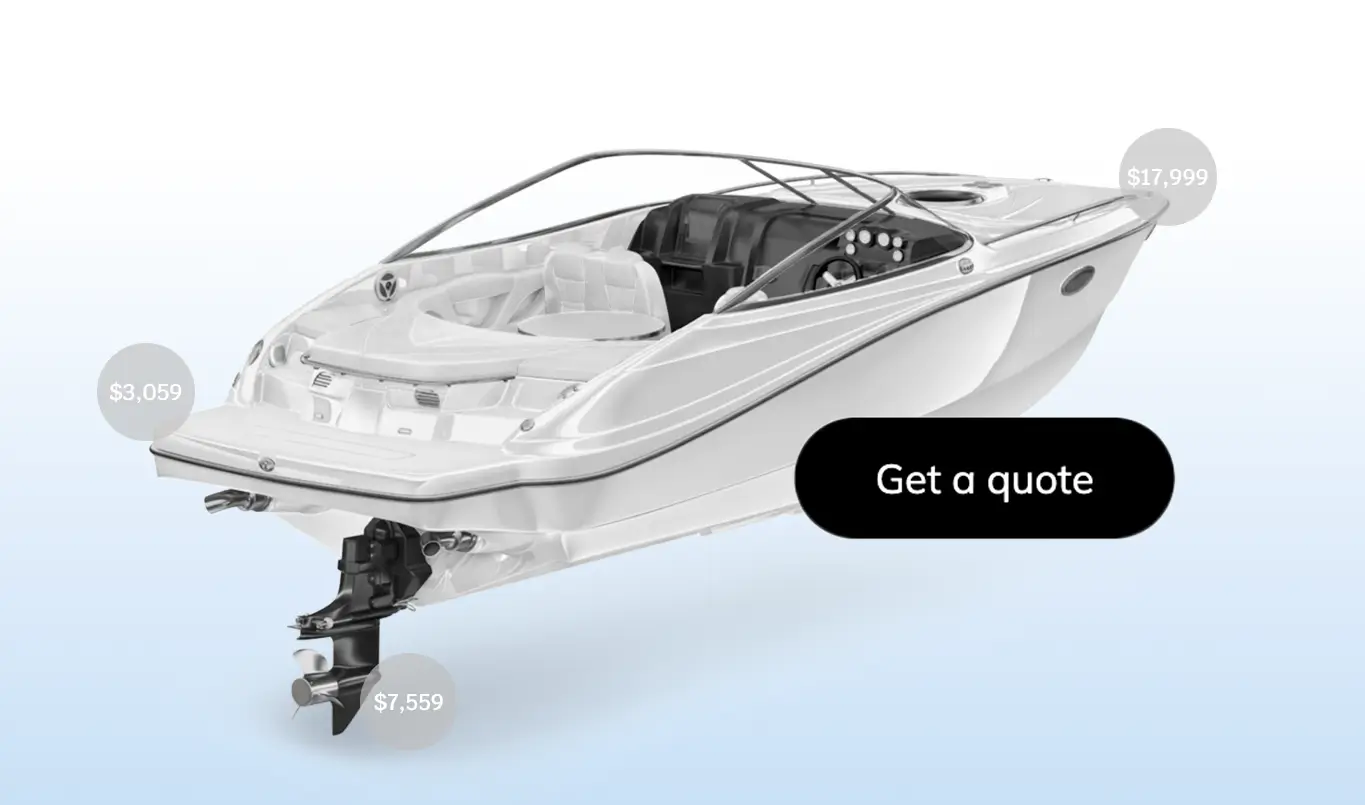
Configure, Price, Quote (CPQ) takes product configurator capabilities to the next level by adding intelligent pricing and quote generation.
Here's how it works: A customer configures their product, the system calculates pricing based on their choices, and generates a professional quote. This is huge for B2B sales, complex products, or high-value items where customers need approval or want to compare options.
With tools like Kickflip's CPQ add-on, the "Add to Cart" button becomes a "Get a Quote" button. Customers submit their configuration, you receive an automatic quote in your dashboard, and you can adjust pricing or terms before sending a professional PDF quote back to them.
Why eCommerce Product Configuration Matters
Customer Benefits 👤
When customers can configure their own products, something powerful happens. They're no longer just buying something off the shelf. They're co-creating it.
Research consistently shows that customization increases perceived value and emotional attachment. When someone chooses the wood type for their baseball bat, picks the color scheme for their shoes, or configures the specs for their laptop, they feel ownership before they even complete the purchase.
This leads to:
Higher engagement during the shopping experience
Better product fit because customers get exactly what they want
Reduced buyer's remorse since they made the key decisions
Stronger brand loyalty from the premium experience
Business Benefits 💰
For merchants, the benefits are just as compelling:
Conversion Rate Boost: Visual configurators with real-time previews can dramatically improve conversion rates. Brands implementing product configurators see significant conversion lifts. Kickflip clients see an average 150% conversion lift after implementing product configurators.
Higher Order Value: When customers can see upgrades and add-ons in context, they're more likely to choose premium options. Dynamic pricing shows the value of each upgrade without sticker shock.
Fewer Order Mistakes: Rule-based configuration prevents customers from ordering impossible combinations. No more manual order reviews or production delays from invalid specifications.
Operational Efficiency: Configure-to-order and assemble-to-order models reduce inventory complexity while giving customers tons of options.
Competitive Advantage: In crowded markets like apparel, sporting goods, or home decor, configuration capability can differentiate your brand from competitors offering only cookie cutter products. This is especially true as market trends show a clear rise in configurator adoption across ecommerce.
Challenges and Trade-offs
Configuration isn't without its challenges:
Complexity: Modeling products with many options and dependencies requires careful planning. You need accurate product data and well-defined rules.
UX Risk: Too many options can overwhelm customers. Poor navigation or confusing interfaces can hurt conversion more than help it.
Maintenance: Configuration rules need updates when products change, new options are added, or manufacturing constraints shift.
The key is starting simple and building complexity gradually based on customer feedback and business needs.
Types of eCommerce Product Configurators
Visual Configurators
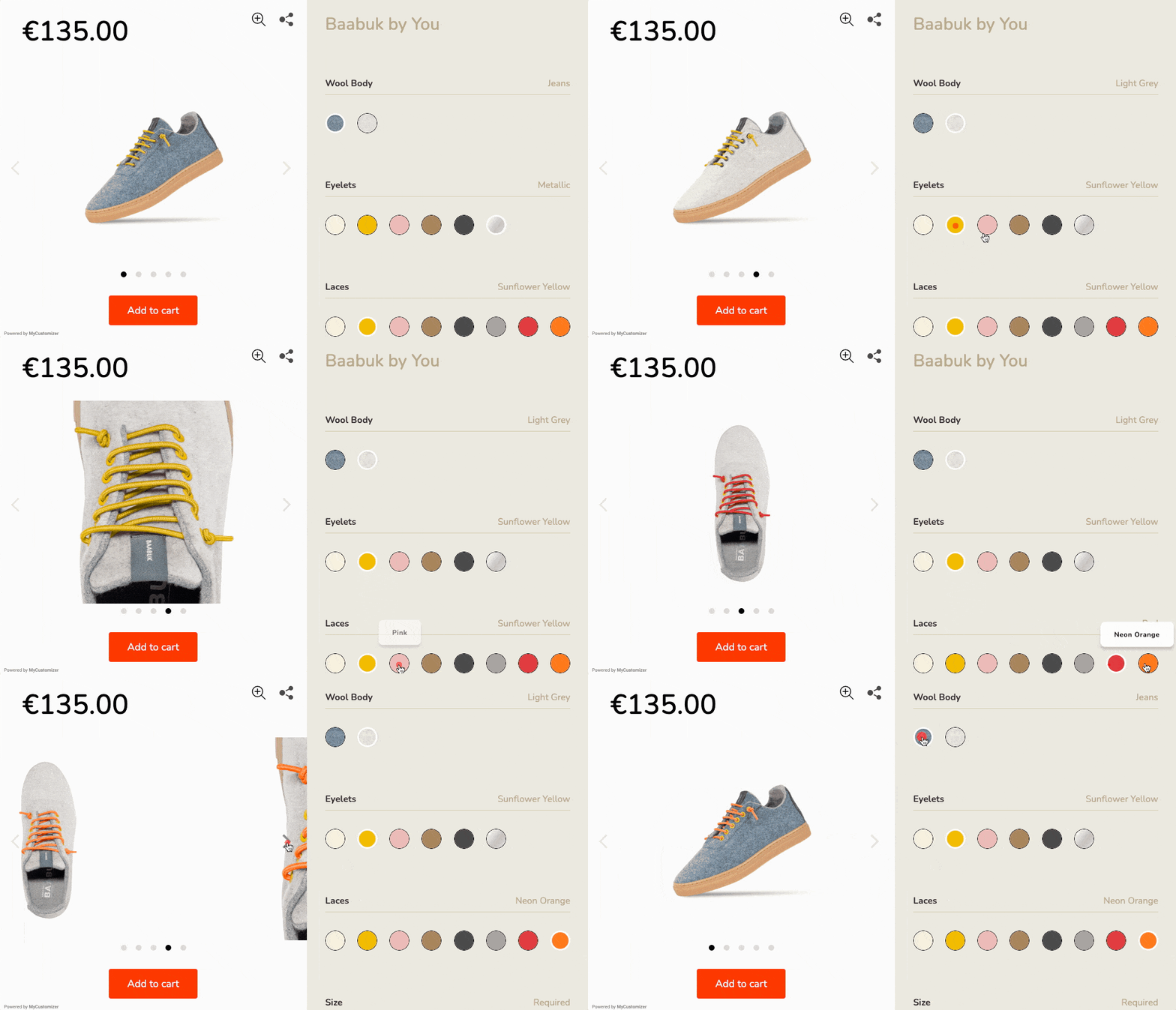
Visual configurators show customers exactly what they're building in real time. This isn't just swapping product photos. It's live preview technology that updates as customers make choices.
The simplest version uses image layers. Choose a red shirt, and the preview shows red. Add a logo, and it appears in the right spot. More advanced systems use 3D and even augmented reality to create fully immersive previews, which can significantly boost engagement and reduce returns.
Visual feedback is crucial for conversion. When customers can see their choices immediately, they feel confident about what they're ordering. It eliminates the guesswork that leads to cart abandonment. This seamless user experience is what transforms browsers into buyers.
Guided Step-by-Step Configurators
Wizard-style configurators break complex products into manageable decisions. Instead of overwhelming customers with every option at once, they guide them through one choice at a time.
This approach works especially well for products with dependencies. Configure a custom bike by first choosing the frame, then compatible components become available. Pick an engine size, and transmission options update accordingly.
Conditional logic is the secret sauce. It hides irrelevant options and keeps the flow simple while ensuring every path leads to a valid configuration.
Pricing-Aware Configurators
Dynamic pricing updates the total cost as customers make selections. This transparency helps shoppers stay within budget while encouraging strategic upgrades.
Smart configurators show relative pricing too. Instead of just "$150 total," they might show "Base model: $100, Premium finish: +$30, Express shipping: +$20." This breakdown helps customers understand the value of each choice.
Pricing rules can get sophisticated. Volume discounts, seasonal promotions, and customer-specific pricing all update in real time based on the configuration.
B2B and CPQ-Centric Configurators
B2B buyers often need quotes rather than immediate checkout. They might need approval, want to compare multiple configurations, or require custom terms.
CPQ configurators replace "Add to Cart" with "Get a Quote." Customers complete their configuration, submit their information, and receive a professional quote with pricing, specifications, and delivery terms.
These systems generate quote IDs, create PDF documents, and track quote status through to order conversion. For complex industrial products or bulk corporate orders, this process is essential.
How to Design a High-Converting Product Configuration Experience
Start from the Customer and Product
Not every product needs full configuration capability. Start by identifying which products offer the highest personalization potential and customer value.
Use this framework to evaluate options:
Must-have: Core choices that significantly impact the product
Nice-to-have: Upgrades and add-ons that increase value
Backend-only: Technical specifications customers don't need to see
Focus on attributes that customers care about most. For custom apparel, that's usually color, size, text, and graphics. For tech products, it might be performance specifications and aesthetic choices.
Map Your Configuration Logic
Before building anything, document your product structure:
List all attributes (color, size, material, features)
Define available options for each attribute
Identify dependencies (which options work together)
Set constraints (which combinations are impossible)
Establish pricing rules for each option
A simple example for custom t-shirts:
Colors: Red, blue, black, white
Sizes: XS through XXL
Text: Custom message (up to 50 characters)
Font: 5 style options
Logo: Upload capability
Constraint: Logos only available on solid colors
Pricing: Base price + $5 for logo + $2 for premium fonts
UX and UI Best Practices
Great configurator UX follows these principles, as detailed by leading UX experts and reinforced by in-depth UX pattern recommendations:
Keep it Linear: Guide customers through logical steps rather than overwhelming them with simultaneous choices.
Show Progress: Step indicators help customers understand where they are and how much is left.
Allow Backtracking: Easy navigation between steps lets customers refine earlier choices.
Use Smart Defaults: Pre-select popular options to speed up the process for less engaged shoppers.
Clear Labeling: Every option should be obvious. Use tooltips for technical details.
Strong Call-to-Action: Whether it's "Add to Cart," "Get Quote," or "Save Configuration," make the next step clear.
Pricing, Upsells, and Margins
Dynamic pricing should feel helpful, not manipulative. Show base pricing upfront, then highlight the value of upgrades.
Smart upselling techniques:
Bundle Related Options: "Popular combo: Premium finish + express shipping"
Show Savings: "Save $15 when you add both options"
Highlight Value: "Most customers choose this upgrade"
Set guardrails to protect margins. Minimum configurations ensure profitability, while maximum limits prevent unrealistic orders.
Implementing eCommerce Product Configuration in Your Store
Choosing the Right Implementation Path
You have two main options for adding configuration to your store:
Custom Development
Time to Launch: 6-12 months
Skills Required: Advanced coding
Flexibility: Complete control
Maintenance: High ongoing cost
Dedicated Platform
Time to Launch: 1-4 weeks
Skills Required: Basic setup skills
Flexibility: Pre-built features
Maintenance: Minimal maintenance
For most ecommerce brands, a dedicated platform like Kickflip makes more sense. You get sophisticated features without the development complexity, and you can launch in weeks rather than months.
What to Look for in an eCommerce Product Configurator Tool
When evaluating configurator platforms, prioritize these capabilities:
No-Code Builder: Marketing and merchandising teams should be able to create and modify configurations without developer help.
Real-Time Visual Preview: Customers need to see their choices immediately for confidence and engagement.
Conditional Logic: Complex products require rules that show only valid combinations.
Dynamic Pricing: Costs should update instantly based on customer selections.
Platform Integration: Seamless connection with Shopify, WooCommerce, Wix, or your existing ecommerce platform.
CPQ Capability: "Get a Quote" workflows for B2B sales and complex orders.
Bulk Ordering: Team orders and corporate gifting require multiple configured items in one purchase.
Kickflip offers all these features in a no-code product customization platform that integrates with major ecommerce systems.
Platform-Specific Considerations
Each ecommerce platform has unique integration requirements:
Shopify: Most configurators offer deep Shopify integration. Look for solutions that can replace product pages entirely or add "Customize" buttons to existing themes. Kickflip's Shopify product customizer provides both options with complete theme compatibility.
WooCommerce: WordPress-based stores need configurators that work with various themes and plugins. API-based solutions offer the most flexibility.
Wix: Hosted platform integrations typically use embed codes or app marketplace installations.
Launch, Test, and Optimize
Start with a pilot approach:
Choose 1-2 flagship products with high customization potential
Launch to a segment of traffic using A/B testing
Track key metrics: configurator engagement, conversion rate, average order value
Gather customer feedback through surveys and support interactions
Iterate based on data before expanding to more products
Test different approaches for step count, default selections, and pricing presentation to optimize performance.
Real-World eCommerce Product Configuration Examples
Classic Market Examples
Dell revolutionized computer sales with configure-to-order laptops. Customers could choose processors, memory, storage, and features while seeing pricing updates in real time. This model transformed a commodity purchase into a premium experience.
Nike's ID platform lets customers customize shoes with colors, materials, and personal text. The visual configurator shows changes immediately, creating emotional attachment before purchase. Research shows this customization increases both perceived value and willingness to pay premium prices. For a broader look at different implementations, a variety of product configurator examples showcase the versatility of this technology across industries.
Kickflip Customer Examples by Vertical
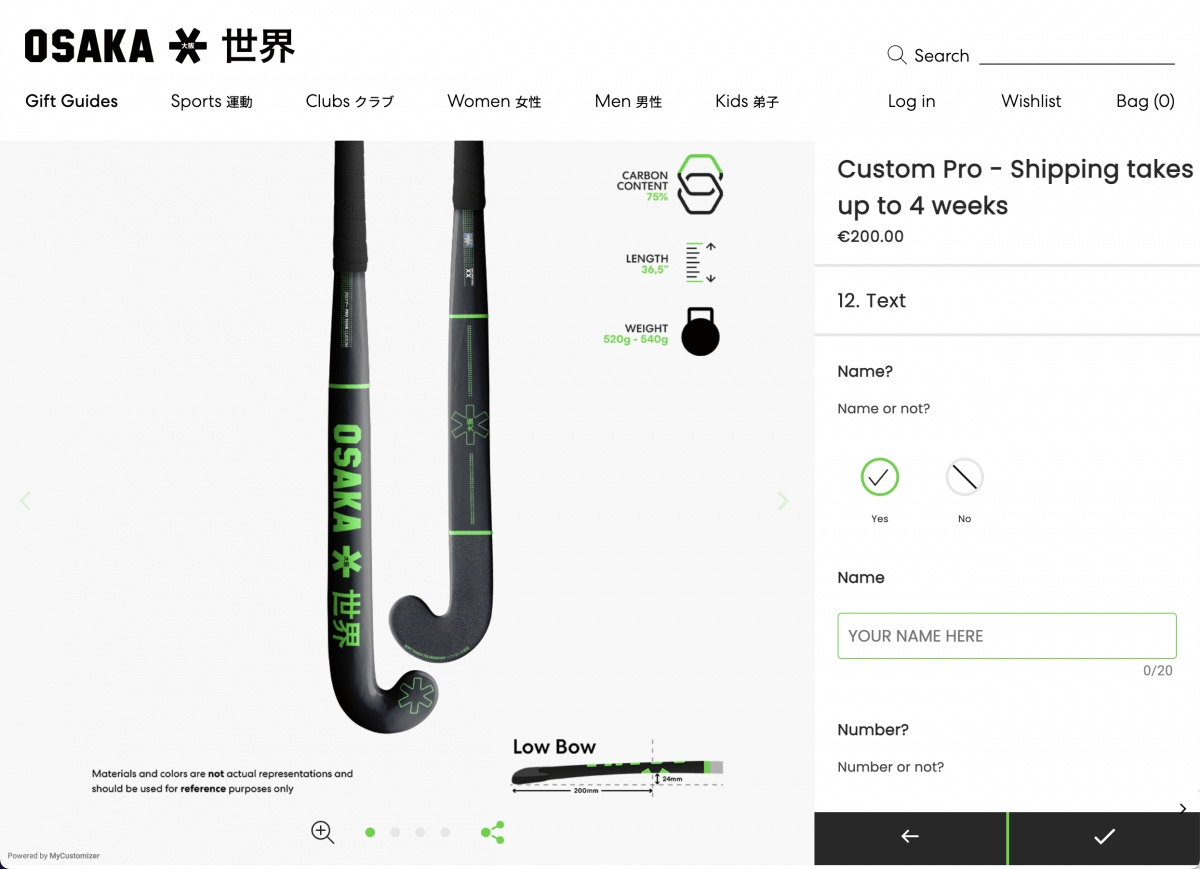
Sporting Goods: Osaka's hockey stick customizers let players choose carbon content, length, and weight, as well as the country flag and club logo. Everything is there to make sure that the stick is tailored to suit the athlete's individual needs, skill level, and unique style.
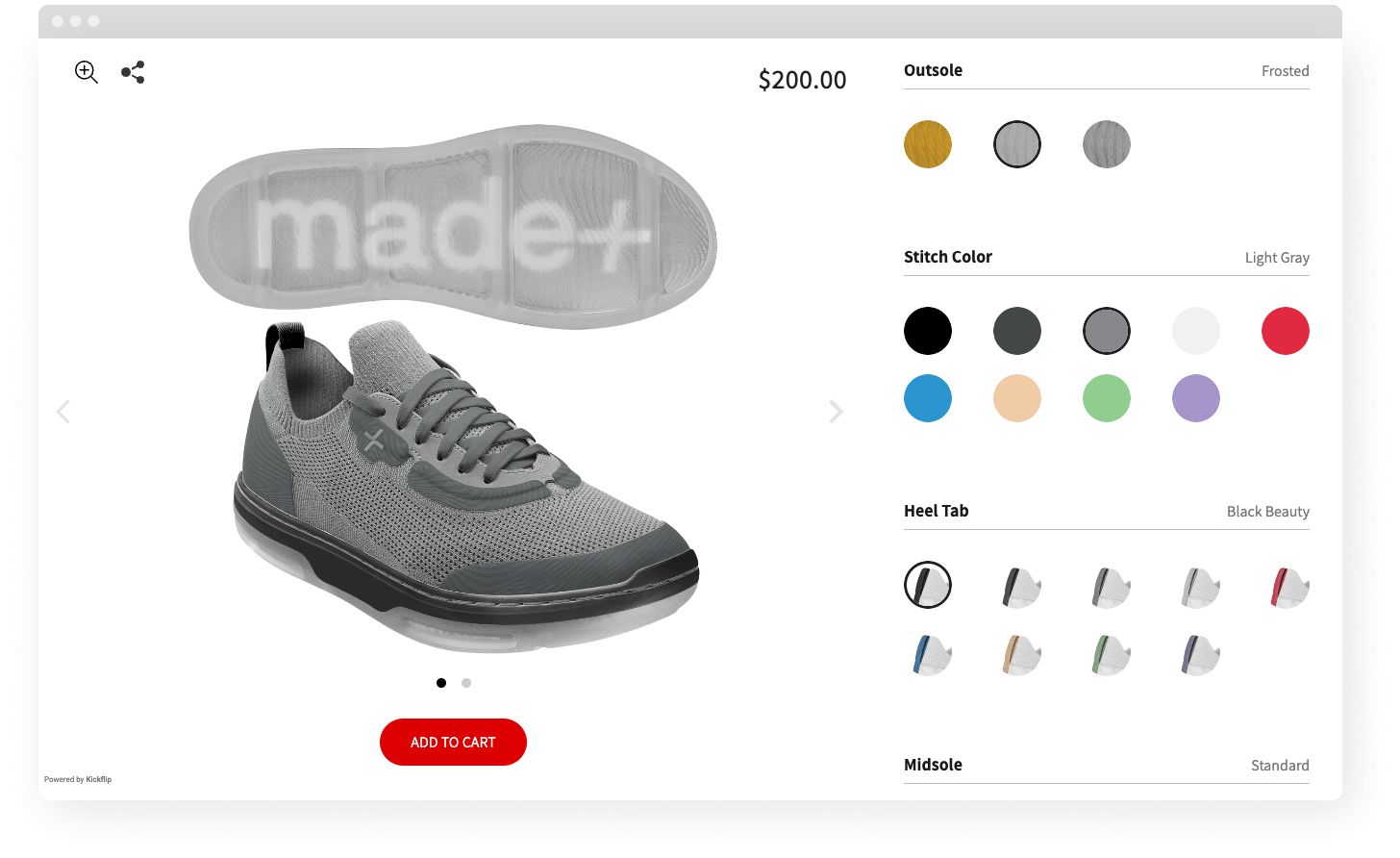
Apparel and Footwear: Made+ demonstrates how footwear brands can offer deep customization. Customers choose materials, colors, sole options, and personal details while seeing their shoe design update in real time.
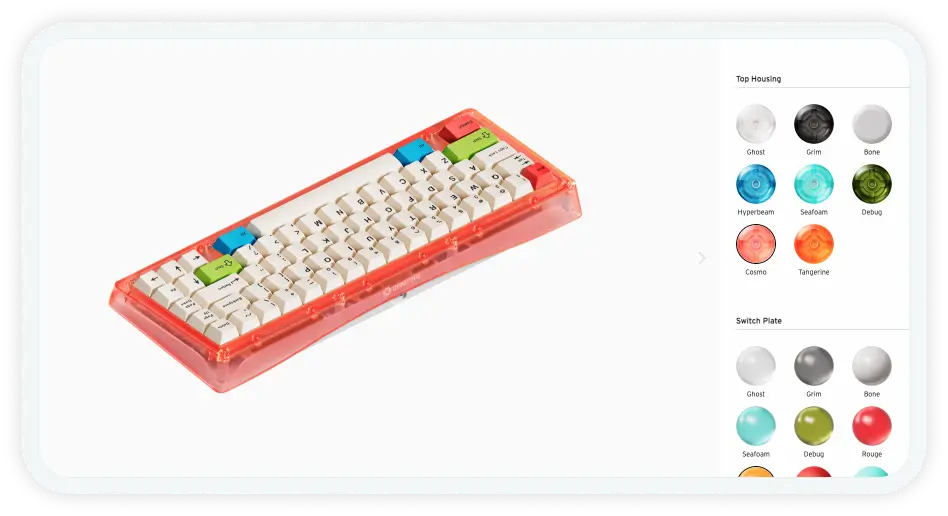
Tech Gear: Omnitype showcases complex component configuration for mechanical keyboards. Users select switch types, keycap materials, case colors, and lighting options with compatibility rules ensuring every configuration works perfectly.
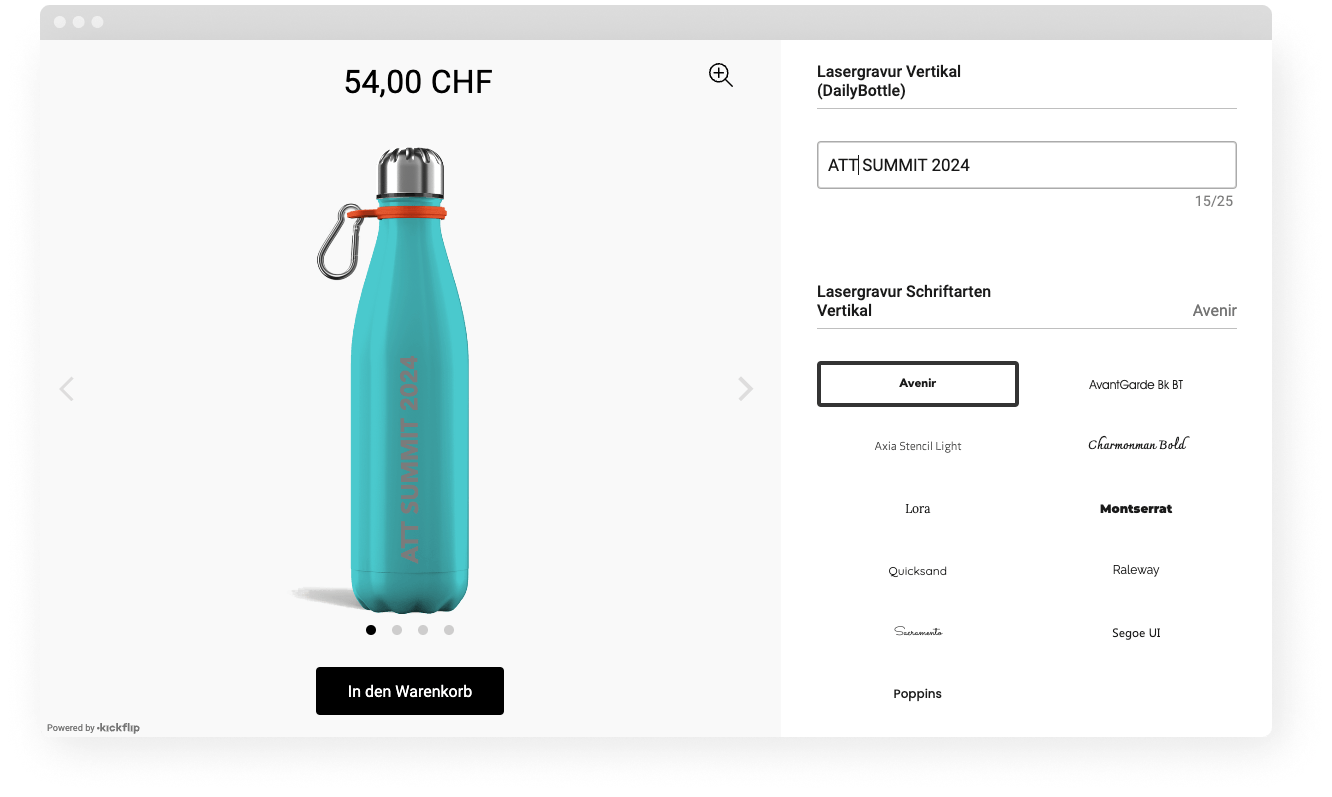
Fitness and Lifestyle: Methetizer "build your own" configurator combines type of bottle, colors, text, and accessories. The visual preview shows exactly how custom water bottles will look with each choice.
These examples share common success patterns:
Clear starting templates that guide new users
Strong visual feedback showing changes immediately
Simple navigation between configuration steps
Transparent pricing with upgrade costs clearly displayed
Smooth checkout or quote process that maintains momentum
Lessons from Top-Performing Configurators
Successful configurators follow these principles:
✅ Start with templates rather than blank slates
✅ Show live previews for immediate feedback
✅ Use progressive disclosure to avoid overwhelming users
✅ Make pricing transparent with clear upgrade costs
✅ Streamline checkout to maintain conversion momentum
You can find more inspiration in Kickflip's customer examples gallery showcasing successful configurations across industries.
Getting Started with eCommerce Product Configuration
Quick-Start Roadmap
Follow this five-step process to launch your first configurator:
Step 1: Identify 1-3 products with the highest customization potential. Look for items with good margins, multiple options, and customer demand for personalization.
Step 2: Map attributes, options, and rules in a spreadsheet. Document what customers can choose, which combinations work together, and how pricing changes.
Step 3: Choose a configurator tool that matches your platform and team skills. Consider integration requirements, visual capabilities, and pricing structure.
Step 4: Build your first configurator and launch it to a segment of traffic. Use A/B testing to compare performance against static product pages.
Step 5: Analyze results and iterate. Track engagement, conversion rates, and customer feedback to refine the experience before expanding.
Where Kickflip Fits into Your Strategy
Kickflip is a product configurator software designed specifically for ecommerce brands that want sophisticated customization without custom development complexity.
Here's what makes Kickflip different:
No-Code Configuration: Build complex product configurators using visual editors instead of code. Marketing teams can create and modify experiences without developer bottlenecks.
Real-Time Visual Previews: Customers see their choices immediately with layered preview technology that creates photorealistic results.
Dynamic Pricing Engine: Costs update automatically based on customer selections, with support for complex pricing rules and promotional offers.
Platform Integration: Native integration with Shopify, WooCommerce, and Wix, plus API connectivity for custom platforms.
CPQ Workflows: Replace "Add to Cart" with "Get a Quote" for B2B sales, complex products, or high-value orders requiring approval.
Proven Results: Kickflip clients see an average 150% conversion rate increase after implementing product configurators.
Kickflip works best for brands that want to launch quickly with professional results. If you have complex configuration needs but limited development resources, it's often the ideal choice over custom building.
Transform Your Static Products into Interactive Experiences
The ecommerce landscape is shifting toward personalization and interactivity. Static product pages that worked five years ago now feel outdated compared to configurators that let customers build their perfect product.
Whether you're selling custom apparel, personalized sporting goods, configurable tech products, or bespoke home decor, ecommerce product configuration can transform your customer experience and bottom line.
Start by auditing your catalog for configuration opportunities. Look for products where customers frequently ask for modifications, items with multiple variants, or categories where personalization adds significant value.
Then explore what's possible with tools like Kickflip. Browse the examples gallery, try the configurator builder, and see how real-time visual previews and dynamic pricing can work for your products.
Ready to move beyond static product pages? The brands winning in ecommerce are the ones giving customers control over their purchase decisions. Make yours one of them.
Frequently Asked Questions
What is ecommerce product configuration?
Ecommerce product configuration is the process of letting customers personalize a product online by choosing from predefined options that always work together. A good ecommerce product configurator guides shoppers step by step, shows a live preview, updates pricing in real time, and uses rules so every configuration is valid and ready to produce.
What is the difference between product configuration and product customization?
Product configuration works with predefined options and rules set by the merchant. Customers choose from available colors, sizes, features, and components, but all combinations are predetermined to be manufacturable. Product customization can be more open-ended, potentially including completely custom designs, measurements, or specifications that require individual engineering or design work.
Which products are best suited for ecommerce product configuration?
Ideal candidates include apparel (custom t-shirts, shoes), sporting goods (bats, equipment), jewelry (rings, necklaces), home decor (furniture, lighting), and tech products (computers, accessories). The best products for configuration have multiple meaningful options, good profit margins, and customer demand for personalization. Products aren't good fits if they're too simple (basic commodities) or too complex (requiring engineering expertise).
How do I add a product configurator to my Shopify, WooCommerce, or Wix store?
For Shopify, you can use apps from the App Store or integrated solutions like Kickflip that either replace product pages entirely or add "Customize" buttons to existing themes. WooCommerce stores typically use plugin solutions or API integrations that work with various themes. Wix stores often use embed codes or marketplace apps. The key is choosing a solution that integrates well with your existing theme and checkout process.
How can I measure the ROI of an ecommerce product configurator?
Track these key metrics: conversion rate (percentage of configurator users who purchase), average order value (revenue per order with configured products), time on page (engagement level), and return rate (quality indicator). Compare configured product performance against static products. Industry benchmarks show configurators can increase conversion rates by 40-150% and higher order values by 20-50%, though results vary by product type and implementation quality.
Future reading
The Best Ecommerce Platform for Custom Products in 2026
Ecommerce Configurator Explained: Examples, Benefits, and Must-Have Features
12 Data-Driven Ways to Improve Ecommerce Customer Experience
Share This article

Written by The Kickflip Team
February 16th, 2026
The Kickflip team is made up of ecommerce specialists, product experts, and engineers behind Kickflip, a product configurator platform for Shopify, WooCommerce, and Wix. Since 2010, we’ve helped thousands of brands scale personalized product experiences, from startups to Fortune 500 companies. On our blog, we share practical insights to help you improve the buying experience and grow your business with product customization.


Maarten Luyckx
Osaka World
The user-friendly interface of Kickflip, combined with excellent customer service, ensured that this project was brought to a successful and beautiful conclusion.
Shopify App Store
May 20, 2021

Marie-Laetitia Rossazza
My Dust Bag
It took me a long time to find the perfect customizer app, and I’m so happy to say that I finally did! Kickflip is truly the best app on the market. The front end and back end are excellent, and the team behind it is incredibly kind and helpful!
Shopify App Store
September 1, 2023

Brad Jurga
All-Star Sporting Goods
Kickflip made everything easy, from designing the builder all the way through launch. We’re designing truly custom equipment for elite baseball players and this platform allows us to have better engagement and excitement around our brand. We’re seeing an instant return.
Shopify App Store
June 16, 2025

Kasper Taylor
CodedInk
My experience with both the product and the support team has been fantastic. The user interface and user experience are excellent. The features are powerful, and the WooCommerce integration is seamless and easy to set up.
G2.com
June 16, 2025

Saber Naceur
Vinylacy
By far, and I truly mean it, the best customizer available on Shopify. It’s easy to understand and manage, offers options for all types of products, and works extremely well. On top of that, it looks beautiful and feels premium. Highly recommended.
Shopify App Store
December 17, 2022

Jesus Guillermo de León Pérez
Dismo
Kickflip is a fantastic tool. It’s super intuitive, easy to use, and packed with capabilities. You don’t have to be an expert or have experience with other products to get started. The support team is also great and very responsive.
Shopify App Store
July 10, 2024

Frieder Urban
Era of Arc
We were looking for an uncomplicated configurator that was quick and easy to set up, offered plenty of design options, and worked reliably with fast loading times. We tested many configurators on the market, and with Kickflip, we found exactly what we needed.
Shopify App Store
October 10, 2024

John Taggart
Jack Harry and Ollie
What a great addition to our business Kickflip has been. It’s been fantastic to offer our customers the ability to personalize their orders. The support has been excellent, and we especially love that the pricing is tied to our success as customers make purchases.
Shopify App Store
May 7, 2021

TJ Garske
The Net Return
Kickflip saves our team a ton of time by eliminating the need to create custom mockups for customers. Customers can build their product themselves and place an order instantly, without any back-and-forth.
G2.com
January 26, 2026

Amin Hasani
CURVD
After extensive research into product customizer tools, we chose Kickflip for many reasons. We don’t like complicating simple tasks for customers, and Kickflip helped us simplify the process and create a seamless customer experience.
Shopify App Store
July 29, 2025