Visual Configurator Guide: Benefits, Examples, and Key Features for Ecommerce Growth
Written by The Kickflip Team
January 29th, 2026

Table Of Contents
- What Is a Visual Configurator?
- Business Benefits of a Visual Configurator for Ecommerce
- In-House Build vs SaaS Visual Configurator Platform
- Key Features to Look For in a Visual Configurator
- Visual Configurator Examples and Use Cases
- How Kickflip Embodies Modern Visual Configurator Best Practices
- Conclusion and Next Steps
- Frequently Asked Questions
Here's the thing: customization is no longer just a nice-to-have feature for ecommerce brands.
It's become a serious growth lever. Brands that nail customization see higher average order values, stronger customer loyalty, and better margins. But here's where it gets tricky.
As your customization options multiply, your ecommerce setup can start to crack under pressure. Customers can't visualize what they're actually buying. Your team drowns in manual emails, spreadsheets, and Photoshop mockups. Option combinations become a nightmare to manage. And worst of all? You start hesitating to launch new configurable products because the customer experience feels clunky and untrustworthy.
Sound familiar?
This is where visual configurators come in. They're not just fancy UI upgrades. They're strategic tools that let you scale customization without sacrificing customer confidence or operational efficiency.
In this guide, I'll walk you through everything you need to know about visual configurators: what they are, how they work, why they matter for your bottom line, and how to choose the right solution for your business. Whether you're an ecommerce manager, founder, or operations leader, you'll walk away with a clear understanding of whether a visual configurator is right for your business and how to evaluate your options like a pro.
What Is a Visual Configurator?
A visual configurator is an interactive ecommerce experience that lets shoppers customize a product and see real-time visual and price updates before they buy.
Core Components That Actually Matter
Every effective visual configurator has three essential components:
Live Visual Preview: The product image updates instantly with every choice the customer makes. No refresh delays, no "loading" screens between selections.
Smart Options Logic: Complex products with multiple variants don't overwhelm customers because the configurator intelligently shows and hides relevant options based on previous choices.
Real-Time Pricing: Transparent pricing updates allow customers to see exactly what they'll pay as they customize, eliminating surprise costs at checkout.
2D vs 3D: Which Do You Actually Need?
Here's where most people overthink things.
2D image-based configurators use layered images, colors, and textures to show customization options. They're fast, reliable, and work perfectly on mobile devices.
3D configurators offer rotation, zoom, and perspective changes. They look impressive but come with trade-offs: higher costs, longer setup times, and potential performance issues. While powerful, the technical frameworks for these are sometimes overkill for typical retail needs.
The truth? In most ecommerce cases, high-quality 2D delivers better speed, adoption, and ROI than 3D. Save 3D for products where rotation meaningfully changes understanding, like furniture or complex mechanical items.
Why This Beats Traditional Product Pages
Traditional product pages with static images and dropdown menus force customers to imagine outcomes. Visual configurators show the outcome directly.
This shift from imagination to visualization changes buyer behavior completely:
Reduced uncertainty and selection errors
Higher confidence at checkout
Better alignment between expectation and delivered product
Stronger emotional connection to the purchase
Integration and Data Flow
The best visual configurators don't exist in isolation. They connect seamlessly with your existing ecommerce ecosystem:
Ecommerce Platform Integration: Whether you're on Shopify, WooCommerce, or Wix, the configurator passes clean configuration data directly into your cart and checkout flow.
Order Management: Configuration details flow automatically to your fulfillment team, eliminating manual data entry and reducing errors.
Inventory Sync: Real-time inventory checks ensure customers can only select available options.
Optional Advanced Integrations: For larger operations, connections to ERP, PIM, or manufacturing systems can automate the entire order-to-fulfillment process.
Business Benefits of a Visual Configurator for Ecommerce
Premium Customer Experience (Your Competitive Edge)
Customers don't just want products. They want experiences.
A visual configurator transforms product selection from a chore into an engaging, trustworthy experience. Instead of guessing what their customized product will look like, customers see it. Instead of wondering about pricing, they know in real-time.
This premium experience becomes your competitive differentiation, especially in crowded markets where products themselves are commoditized.
Higher Engagement and Conversion Rates
Here's what happens when you replace static product pages with visual configurators:
Increased Time on Page: Interactive experiences naturally keep customers engaged longer. More time means more consideration, which typically leads to higher conversion.
Psychological Ownership: When customers design a product, they develop emotional attachment. They've invested time and creativity. Walking away feels like a loss.
Reduced Checkout Hesitation: Clear previews eliminate the uncertainty that causes cart abandonment. Customers know exactly what they're buying.
Research from academic studies documents that mass customized products through visual configurators significantly increase customer satisfaction and emotional engagement, which directly correlates with conversion improvements.
Increased Average Order Value and Margins
Visual configurators are revenue accelerators, not just conversion tools.
Visible Upselling: When customers can see the difference premium options make, they're more likely to upgrade. A basic product might look fine until they see the premium version side-by-side.
Bundle Optimization: Configurators can suggest complementary options that customers might not have considered independently.
Dynamic Value Communication: Real-time pricing helps customers understand the value of each upgrade, making higher-priced options feel justified rather than expensive.
Fewer Returns and Stronger Purchase Confidence
Customization traditionally comes with higher return rates because customers' expectations don't match reality.
Visual configurators flip this dynamic:
Expectation Alignment: What customers see is what they get
Informed Decisions: Clear previews reduce buyer's remorse
Quality Perception: Interactive experiences signal product quality and brand professionalism
This is especially impactful for products with historically high return rates: apparel, home decor, and personalized items.
Operational Efficiency and Scalability
Here's where visual configurators really pay for themselves: they eliminate manual processes that don't scale.
No More Email Tennis: Instead of back-and-forth emails about options and pricing, customers self-serve through the configurator.
Centralized Logic: All your product rules, pricing, and options live in one system instead of scattered across spreadsheets and team members' heads. For manufacturing, this allows for systematic management of complexity that scales with Industry 4.0 demands.
Faster Product Launches: With the right visual configurator platform, new configurable products can go live in weeks not months.
In-House Build vs SaaS Visual Configurator Platform
We get it. Building your own configurator feels like the ultimate solution. Complete control, perfect customization, no monthly fees.
But here's the reality check, you will need deep pockets and a ton of time to make this options work:
In-House Build
Time to Market: 12-18 months
Initial Cost: $500k+
Ongoing Maintenance: Dedicated dev team
Feature Updates: Build everything yourself
Risk Level: High (technical debt)
Flexibility: Ultimate control
SaaS Platform
Time to Market: 2-4 weeks
Initial Cost: $99-$999/month
Ongoing Maintenance: Handled by platform
Feature Updates: Regular platform updates
Risk Level: Low (proven solution)
Flexibility: Configurable within limits
Unless you're a large enterprise with dedicated engineering resources and unique requirements, SaaS platforms deliver better speed, reliability, and ROI. You can get an unbiased market overview by consulting user reviews and ratings on G2.
Key Features to Look For in a Visual Configurator
Visual Quality and User Experience
Your configurator's visual quality directly impacts customer trust and conversion. Here's what matters:
Image Resolution and Compression: Look for platforms that support high-quality images with smart compression for fast loading times.
Smooth Transitions: Changes between options should feel instant, not clunky. Laggy updates kill the interactive experience.
Mobile Optimization: Since most traffic is mobile, the configurator must work perfectly on small screens with touch interactions.
Brand Consistency: The configurator should match your brand's look and feel, not stick out like a third-party widget.
Rules Engine and Conditional Logic
Academic research on product configurators confirms that robust rules engines and rendering capabilities are foundational to effective visual configuration systems.
Conditional Questions: Show or hide options based on previous selections to prevent overwhelming customers.
Compatibility Rules: Automatically prevent invalid combinations (like incompatible materials and colors).
Dynamic Pricing and Discount Logic
Pricing flexibility makes or breaks customization experiences:
Real-Time Calculations: Prices update instantly as customers make selections.
Pricing Formulas: Support for complex calculations based on dimensions, quantities, or material costs.
Incremental pricing: A strategy where prices are designed to be compared against each other, not evaluated in isolation. For example, when configuring a Mac, Apple never asks you to decide whether “$500 is expensive for RAM”. You start with a base system that already includes RAM and are only asked whether adding more is worth $250 more in this specific computer. By framing the price as a difference from the base model, not as a standalone purchase, the decision remains contextual, concrete, and easy to evaluate.
Currency Localization: Multi-currency support for international customers.
Product personalization Tools
Modern customers expect rich personalization options:
Text Customization: Names, messages, or custom text with font and placement controls.
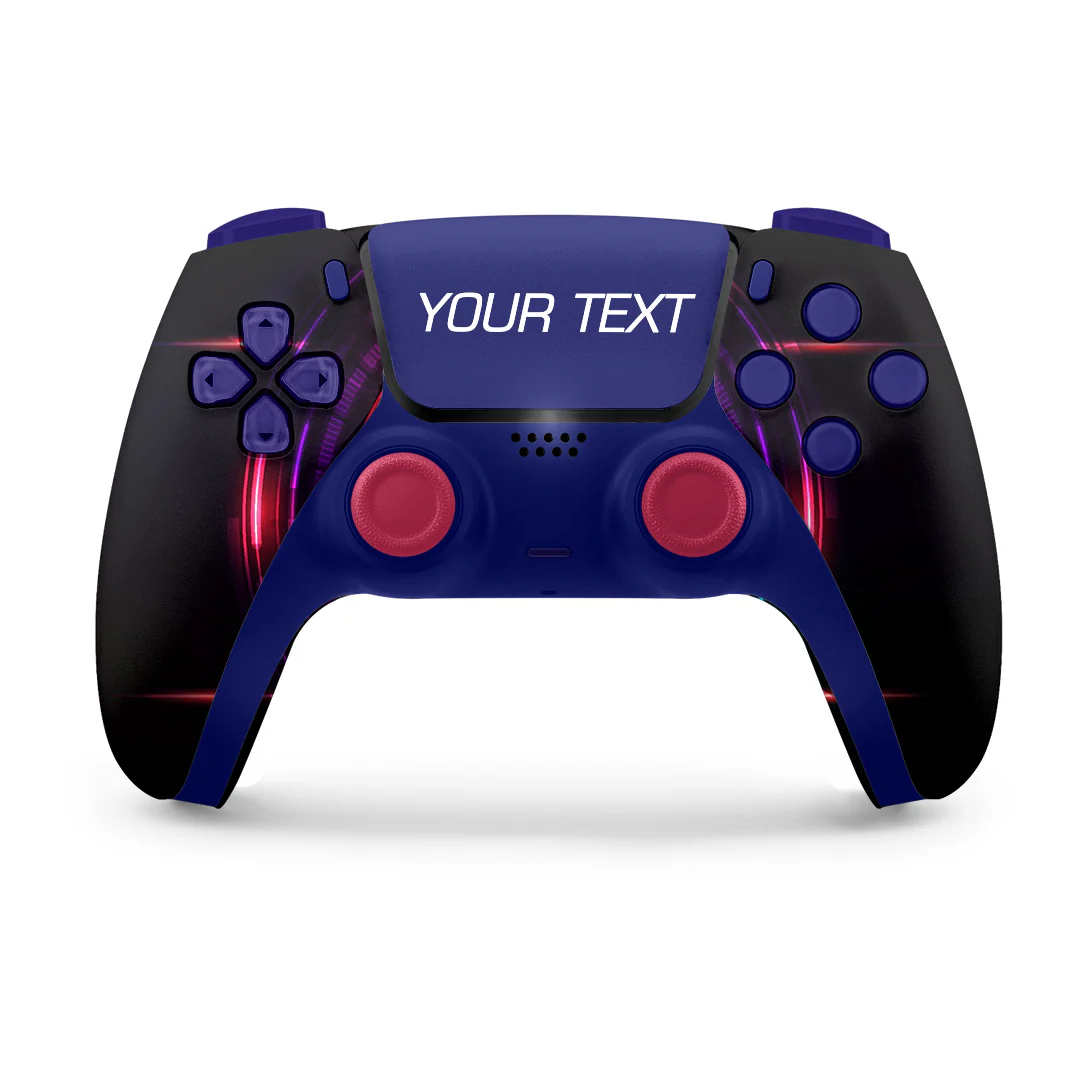
Image Uploads: Customer logos or photos with resize, rotation, and positioning tools.
Print File Generation: Automatic creation of print-ready files for manufacturing.
Preview Accuracy: What customers see matches what they receive.
Integrations and Ecosystem Fit
Your configurator needs to play well with your existing tools:
Ecommerce Platforms: Native integrations with Shopify, WooCommerce, Wix, and other major platforms.
Payment Processing: Seamless handoff to your checkout flow with all configuration data intact.
Inventory Management: Real-time stock checking to prevent overselling configured options.
Performance, Security, and Reliability
These aren't glamorous features, but they're critical:
Loading Speed: Configurators must load quickly and respond instantly to customer interactions.
Uptime Reliability: Uptime ensures customers can always access the configurator.
Data Security: Secure handling of customer uploads and personal information.
Scalability: In a world where Black Friday has become one of the busiest days of the year for online shopping, with U.S. consumers spending a record $11.8 billion in online sales in 2025 alone, your configurator needs to be ready for massive, concentrated traffic spikes.
Admin Experience and Scalability
Here's what many people overlook: a content management system is a core buying criterion, not a secondary concern. When it’s nonexistent, day-to-day operations grind to a halt because every update depends on the configurator provider. Simple changes like pricing adjustments, option updates, visuals, rules, or product tweaks turn into back-and-forth emails, support tickets, and waiting queues.
Over time, the business becomes constrained by the provider’s availability rather than its own strategy, which is especially damaging during peak periods or fast-moving sales cycles where speed and independence directly impact revenue. Here’s what to look for:
No-Code Setup: Non-technical team members should be able to create and update configurators.
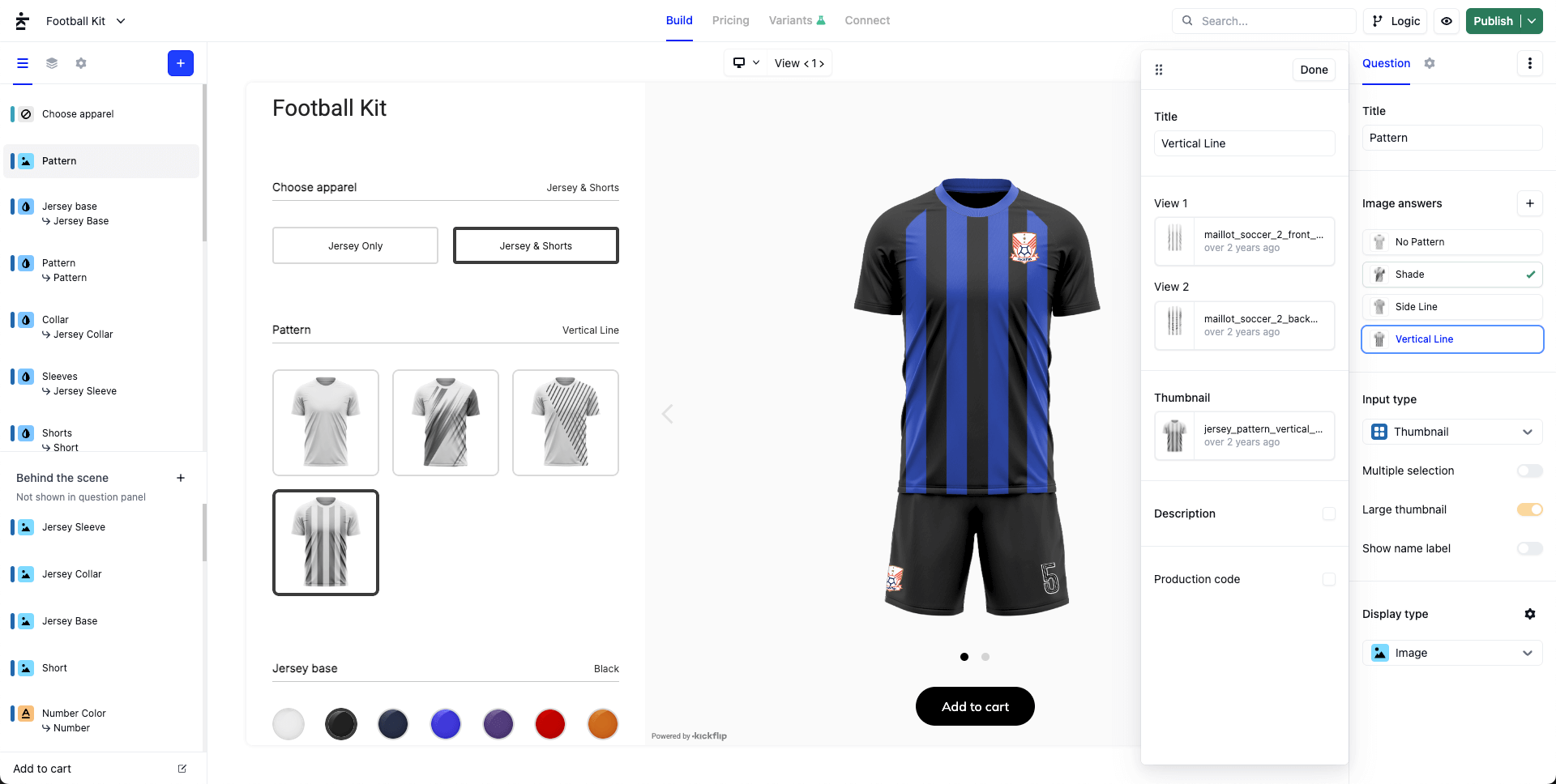
Bulk Operations: Easy ways to update pricing, add options, or modify rules across multiple products.
Version Control: Safe ways to test changes without breaking live configurators.
Visual Configurator Examples and Use Cases
Apparel and Footwear
The40DollarTee is a custom apparel company built around fast, low-friction product personalization, allowing customers to create one-off or small-batch t-shirts and hoodies with their own artwork and no minimum order requirements. Their strategy prioritizes simplicity and speed: customers select a blank garment, upload a design, see pricing update immediately, and receive their order within days. By removing traditional barriers like bulk minimums, long production timelines, and complex quoting, The40DollarTee enables creators, small brands, and individuals to test ideas, produce samples, and launch designs quickly without upfront risk.
Sporting Goods
Ogilvy Equestrian is a Canadian equestrian brand known for designing and producing premium saddle pads, half pads, and riding accessories that prioritize comfort, protection, and performance for both horse and rider. Their product customization strategy includes offering custom-option saddle pads and gear where riders can choose styles, colors, and configurations suited to their discipline (like jumping or dressage), letting them tailor key features to individual needs and tastes while still delivering high-quality, performance-driven equipment that reflects their personal riding preferences.

Jewelry and Accessories
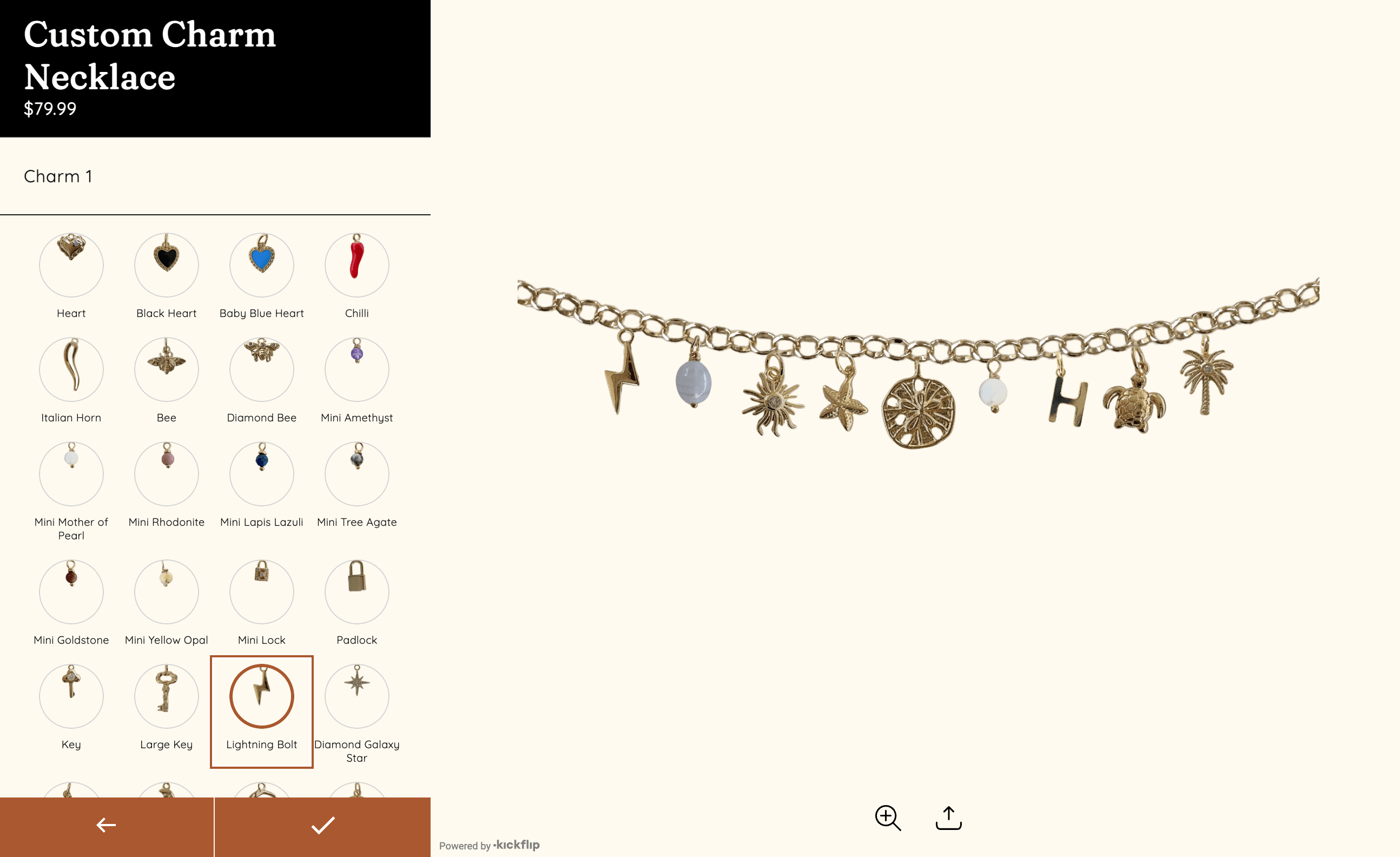
Haylo & Co is a jewelry brand centered on self-expression through modular product personalization, allowing customers to create custom charm necklaces and bracelets by selecting chains, charms, gemstones, and add-ons that reflect their personal style or story. Their strategy makes customization feel playful and accessible rather than complex, guiding customers through a simple mix-and-match experience while maintaining a cohesive aesthetic and consistent quality. By combining customizable pieces with curated pre-made options, Haylo & Co balances creativity, emotional value, and ease of purchase.
Home Decor and Furniture
Coley Home is a direct-to-consumer furniture brand that has built its business around made-to-order customization at scale, offering upholstered furniture like beds, sofas, and chairs that customers can personalize through a curated selection of fabrics, trims, and finishes. Coley Home produces each piece after purchase in its own North Carolina manufacturing facility, which allows the brand to balance personalization with quality control and relatively fast lead times.
How Kickflip Embodies Modern Visual Configurator Best Practices
When evaluating visual configurator platforms, it's helpful to see how leading solutions address real-world challenges. Kickflip serves as an excellent example of modern best practices in action.
No-Code Setup and Speed to Market
Kickflip's approach eliminates the traditional development bottleneck. Business users can create sophisticated configurators using transparent PNG images and intuitive rule-building tools. What used to require months of custom development now takes weeks.
This no-code philosophy means your marketing and product teams can iterate quickly without waiting for developer resources. You don't have to worry about technical complexity slowing down your growth plans.
Premium Experience
The platform optimizes for the customer experience elements that actually drive conversion:
High-quality image rendering with smart compression
Instant visual updates with no loading delays
Mobile-first design that works perfectly on smartphones
Brand-consistent theming that feels native to your store
This is the premium experience your customers expect, not a cookie cutter solution that looks like every other configurator.
Robust Logic for Complex Products
Kickflip's rules engine handles the conditional logic that makes or breaks customization experiences:
Show/hide options based on previous selections
Prevent incompatible combinations automatically
Support for complex pricing formulas and calculations
Bulk rule management for products with hundreds of options
Seamless Ecommerce Integration
The platform integrates natively with major ecommerce platforms:
Shopify: Full integration with cart, checkout, and order management
WooCommerce: Complete data sync and pricing integration
Wix: Official app with streamlined setup process
This deep integration with Shopify and other platforms is completely crucial. You need configuration data flowing automatically into your order system without manual intervention.
Professional Asset Creation Support
For teams without in-house resources, Kickflip works with a network of certified partners to help brands create high-quality visual assets for their configurators. This approach removes one of the biggest hurdles in launching a configurator: producing professional, production-ready visuals.
Conclusion and Next Steps
The customization opportunity isn't going away. It's accelerating. The question isn't whether you'll need better tools to manage complexity and scale. The question is whether you'll get those tools before your competitors do.
Visual configurators aren't just about making product pages look cooler. They're strategic tools that help you scale customization profitably.
The brands winning with customization understand this: as your options multiply, you need systems that maintain customer confidence while eliminating operational chaos. Visual configurators deliver both.
How to Get Started
Start with One Product: Pick your best-selling customizable product or a new launch where you can measure clear before/after results.
If you're ready to see how a modern visual configurator could work for your business, Kickflip offers a free trial that lets you build and test a configurator risk-free. Our team can help you create a professional-quality configurator that drives real business results.
Frequently Asked Questions
How long does it take to set up a visual configurator?
With modern no-code platforms like Kickflip, setup typically takes 2-4 weeks for most products. The timeline depends mainly on asset creation (product images) rather than technical development.
Do I need 3D models for an effective visual configurator?
No. High-quality 2D images often deliver better performance and conversion rates than 3D, especially on mobile devices. Choose 3D only when rotation meaningfully improves customer understanding.
Will a visual configurator slow down my website?
Modern configurators are built for performance with optimized image compression and fast loading times. A well-implemented configurator should actually improve your page performance by reducing bounces and increasing engagement.
How do visual configurators handle complex pricing?
Advanced configurators support dynamic pricing formulas and real-time calculations based on customer selections. Pricing updates happen instantly as customers customize.
Can configurators integrate with my existing ecommerce platform?
Yes. Leading platforms like Kickflip offer native integrations with major ecommerce platforms such as Shopify, WooCommerce, Wix. Configuration data flows directly into your cart and order management system.
What kind of products work best with visual configurators?
Any product with customizable options benefits, but configurators are especially effective for: apparel and accessories, sporting goods, jewelry, furniture, and B2B products with complex specifications.
How do I create the visual assets needed for a configurator?
You can create assets in-house using design tools like Photoshop, or work with specialized services that focus on configurator-ready visual assets. The key is consistent, high-quality transparent PNG images.
Future reading
3D Product Configurator - Everything You Need to Know
Major Features of a Product Configurator (And How They Grow Ecommerce Sales)
What Is a Configurator? A Guide for Modern Ecommerce
Share This article

Written by The Kickflip Team
January 29th, 2026
The Kickflip team is made up of ecommerce specialists, product experts, and engineers behind Kickflip, a product configurator platform for Shopify, WooCommerce, and Wix. Since 2010, we’ve helped thousands of brands scale personalized product experiences, from startups to Fortune 500 companies. On our blog, we share practical insights to help you improve the buying experience and grow your business with product customization.


Maarten Luyckx
Osaka World
The user-friendly interface of Kickflip, combined with excellent customer service, ensured that this project was brought to a successful and beautiful conclusion.
Shopify App Store
May 20, 2021

Marie-Laetitia Rossazza
My Dust Bag
It took me a long time to find the perfect customizer app, and I’m so happy to say that I finally did! Kickflip is truly the best app on the market. The front end and back end are excellent, and the team behind it is incredibly kind and helpful!
Shopify App Store
September 1, 2023

Brad Jurga
All-Star Sporting Goods
Kickflip made everything easy, from designing the builder all the way through launch. We’re designing truly custom equipment for elite baseball players and this platform allows us to have better engagement and excitement around our brand. We’re seeing an instant return.
Shopify App Store
June 16, 2025

Kasper Taylor
CodedInk
My experience with both the product and the support team has been fantastic. The user interface and user experience are excellent. The features are powerful, and the WooCommerce integration is seamless and easy to set up.
G2.com
June 16, 2025

Saber Naceur
Vinylacy
By far, and I truly mean it, the best customizer available on Shopify. It’s easy to understand and manage, offers options for all types of products, and works extremely well. On top of that, it looks beautiful and feels premium. Highly recommended.
Shopify App Store
December 17, 2022

Jesus Guillermo de León Pérez
Dismo
Kickflip is a fantastic tool. It’s super intuitive, easy to use, and packed with capabilities. You don’t have to be an expert or have experience with other products to get started. The support team is also great and very responsive.
Shopify App Store
July 10, 2024

Frieder Urban
Era of Arc
We were looking for an uncomplicated configurator that was quick and easy to set up, offered plenty of design options, and worked reliably with fast loading times. We tested many configurators on the market, and with Kickflip, we found exactly what we needed.
Shopify App Store
October 10, 2024

John Taggart
Jack Harry and Ollie
What a great addition to our business Kickflip has been. It’s been fantastic to offer our customers the ability to personalize their orders. The support has been excellent, and we especially love that the pricing is tied to our success as customers make purchases.
Shopify App Store
May 7, 2021

TJ Garske
The Net Return
Kickflip saves our team a ton of time by eliminating the need to create custom mockups for customers. Customers can build their product themselves and place an order instantly, without any back-and-forth.
G2.com
January 26, 2026

Amin Hasani
CURVD
After extensive research into product customizer tools, we chose Kickflip for many reasons. We don’t like complicating simple tasks for customers, and Kickflip helped us simplify the process and create a seamless customer experience.
Shopify App Store
July 29, 2025