Best Shopify Themes for Custom Products: Expert Guide for 2026
Written by Édouard Grondin-Fortin
February 12th, 2026

Table Of Contents
- How Shopify themes impact custom product experiences
- Key criteria for choosing Shopify themes for custom products
- Best Shopify themes for custom products (expert picks)
- How to evaluate and test a Shopify theme for custom products
- Implementing Kickflip with your chosen Shopify theme
- Advanced considerations for custom product themes
- Transform your Shopify store with professional customization solutions
- Frequently asked questions
Choosing the right Shopify theme for your custom product store can make the difference between seamless personalization experiences and frustrated customers abandoning their carts. When you're selling customizable products that require real-time previews, dynamic pricing, and complex option selections, your theme becomes more than just a visual design choice. It becomes the foundation that determines whether product customizers integrate smoothly, load quickly, and convert visitors into buyers.
Most merchants underestimate how dramatically theme performance, layout flexibility, and code quality affect their customization workflows. A poorly chosen theme can slow down real-time previews, break mobile experiences, and create integration nightmares that require expensive developer work to resolve. Meanwhile, the right theme creates a clean, responsive canvas that makes product personalization feel effortless for customers and profitable for store owners.
This guide examines the best Shopify themes specifically for custom products, based on extensive testing across hundreds of personalization-focused stores. You'll discover which themes from the official Shopify Theme Store deliver the performance, flexibility, and compatibility needed for successful product customizers. We'll cover everything from free options like Dawn to premium themes like Motion and Reformation, plus the technical criteria that separate mediocre themes from exceptional ones for customization use cases.
How Shopify themes impact custom product experiences
Performance and page speed for real-time previews
Fast, lightweight Shopify themes are absolutely critical for smooth real-time customization previews. When customers modify colors, add text, or upload images through a product configurator, they expect instant visual feedback. Every millisecond of delay increases the likelihood they'll abandon their customization and leave your store.
Slow themes create a cascade of performance problems for custom products. Heavy JavaScript files, unoptimized images, and bloated CSS can cause preview rendering delays, making the personalization process feel clunky and unresponsive. According to Shopify's performance standards, themes should achieve Core Web Vitals scores that support real-time interactions without lag.
Official Shopify themes and Shopify-approved themes undergo rigorous performance testing before approval. These themes are built with clean, optimized code that provides the stable foundation needed for embedding product customizers without compromising speed.
Mobile UX and layout flexibility
With mobile traffic representing the majority of ecommerce visits, responsive design becomes essential for customization flows. Mobile users need to easily navigate through product options, preview their customizations, and complete purchases without pinching, zooming, or struggling with tiny interface elements. Creating a good mobile UX is not optional.
The most effective product page layouts for configurators include full-width preview images, sticky customization summaries, and collapsible option sections that work seamlessly across all screen sizes. These layout patterns ensure that customers can see their personalized product clearly while having quick access to modification controls.
Flexible section-based layouts, particularly those built on Shopify's Online Store 2.0 framework, provide the modular structure needed to accommodate configurator iframes, custom buttons, and dynamic option fields without breaking the overall page design.
Clean code and app compatibility
Well-structured, standards-based code makes it dramatically easier to integrate product customizers like Kickflip with your Shopify theme. The most common integration challenges, as noted by merchants in community forums, involve replacing the default "Add to Cart" button with a "Customize" button, passing line item properties correctly, and ensuring that customized product details display properly in the cart and checkout.
Official Shopify themes and themes approved by Shopify follow consistent coding standards that make these integrations more predictable and reliable. Their template structure, Liquid markup, and JavaScript patterns align with Kickflip's integration technology, reducing the likelihood of compatibility issues.
Custom themes or heavily modified templates, such as those found on third-party marketplaces like ThemeForest, often require additional developer work to achieve smooth integration with product customizers or any other integration for that matter. The time and cost savings from choosing a compatible theme upfront typically far exceed any premium theme investment.
Native theme features vs app-powered customization
Most themes offer basic "out of the box" customization options like color swatches or size selectors. However, these native features have significant limitations when it comes to advanced personalization like custom text placement, image uploads, or real-time visual previews with dynamic pricing.
Serious custom product stores pair a robust theme with a dedicated product configurator app rather than trying to stretch theme features beyond their capabilities. The theme serves as the optimized "canvas" while tools like Kickflip provide the sophisticated "paint" needed for complex product personalization.
This separation of concerns allows merchants to choose themes based on performance, design quality, and technical reliability, while relying on specialized configurator apps for advanced personalization features that themes simply weren't designed to handle.
Key criteria for choosing Shopify themes for custom products
Must-have technical criteria
Fast, optimized code that meets Shopify's performance benchmarks forms the foundation of any effective custom product theme. Themes should achieve strong Core Web Vitals scores, load critical resources quickly, and maintain responsive performance even when embedding interactive configurators.
Responsive design and strong mobile UX are non-negotiable for custom product themes. Every configurator element, from option controls to preview images, must work smoothly on smartphones and tablets. Poor mobile experiences directly translate to abandoned customizations and lost revenue.
Flexible section-based layouts, particularly those built on Online Store 2.0, provide the modular structure needed for positioning configurators and supporting content. These themes allow you to reorganize product page sections, hide standard elements when needed, and create dedicated templates for customizable products.
UX and merchandising criteria
Support for multiple product images, galleries, and zoom functionality becomes crucial for showcasing custom variants effectively. Customers need to see their personalized products from different angles and examine details before committing to a purchase.
Clear visual hierarchy ensures that configurator controls and option selections don't compete with other page elements for attention. The best themes for custom products create enough visual space for personalization interfaces while maintaining clean, conversion-focused layouts. You can learn how to optimize your Shopify product page to achieve this balance.
Room for educational content like size guides, FAQ sections, and how-it-works explanations helps customers understand the customization process and make confident decisions. Custom products often require more explanation than standard items, so themes need flexible content areas to accommodate this additional information.
Integration and scalability criteria
Compatibility with Shopify's app ecosystem, especially product customizers and line item property apps, prevents integration headaches and ensures smooth operation across your entire tech stack. Themes that follow Shopify's development standards integrate more reliably with third-party apps.
Theme support quality, documentation, and update history on the Shopify Theme Store provide important indicators of long-term reliability. Well-supported themes receive regular updates for new Shopify features and security requirements, protecting your investment over time.
Scalability considerations become important when expanding from a few custom products to a catalog where many products are customizable. Your chosen theme should handle increased complexity without requiring a complete redesign or migration.
Free vs paid Shopify themes for custom products
Starting with a free theme like Dawn can make sense for merchants testing custom product concepts or working with limited budgets. Dawn provides solid technical foundations and Online Store 2.0 features that support basic configurator integration.
However, premium themes from sources like Ecomm Design often offer superior design quality, additional layout options, and enhanced mobile experiences that can improve conversion rates for custom products. The investment typically pays off when personalization becomes a core part of your business model.
Cost versus benefit analysis should consider not just the theme price, but also potential developer costs for customization, ongoing support needs, and the revenue impact of improved conversion rates from better user experiences.
Best Shopify themes for custom products (expert picks)
Dawn (free, Online Store 2.0 baseline)
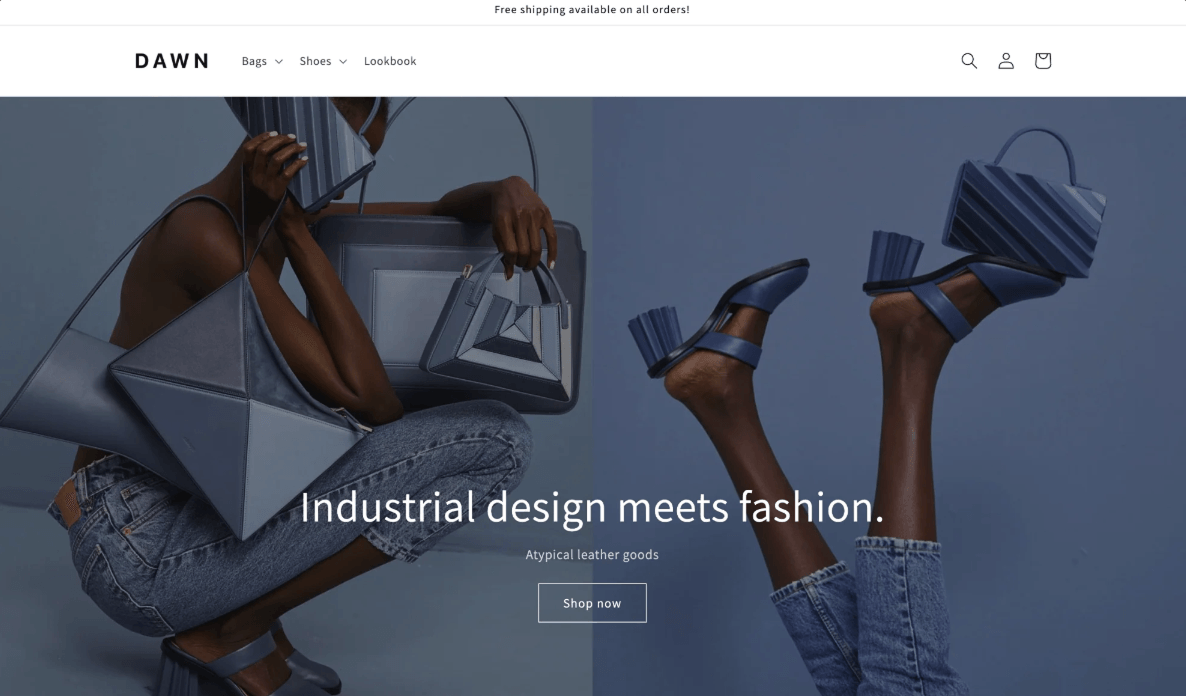
Dawn serves as an excellent starting point for many custom product stores, offering the technical foundations needed for successful configurator integration without any upfront theme cost. As Shopify's flagship free theme, Dawn provides clean, optimized code that meets modern performance standards.
The section-based structure and flexible layouts work well with embedded customizers, allowing merchants to create dedicated product templates for customizable items. Dawn's minimalist design doesn't compete with configurator interfaces for visual attention, creating a clean canvas for product personalization.
Typical integration with product customizers like Kickflip involves replacing the standard "Add to Cart" button with a "Customize" button and creating a dedicated product template where configurator elements can be properly positioned. Dawn's predictable code structure makes these modifications straightforward.
Best use cases include testing custom product concepts, launching with limited budgets, or building stores where customization is a secondary feature. Potential limitations emerge with very complex customization flows that require advanced layout options or premium design elements.
Motion (by Archetype Themes)

Motion from Archetype Themes represents a premium choice specifically designed for modern ecommerce experiences. The theme's modular sections, contemporary product pages, and visual storytelling capabilities make it particularly effective for custom products that benefit from rich visual presentation.
Strengths for custom products include excellent performance optimization, sophisticated mobile UX, and layout flexibility that supports real-time previews without compromising overall design quality. Motion's product page templates provide ample space for configurator widgets while maintaining professional visual hierarchy.
Merchants who want a design-forward store with seamless personalization often choose Motion because it balances aesthetic appeal with technical functionality. The theme's premium features like advanced image galleries and flexible content sections enhance the overall customization experience.
Reformation
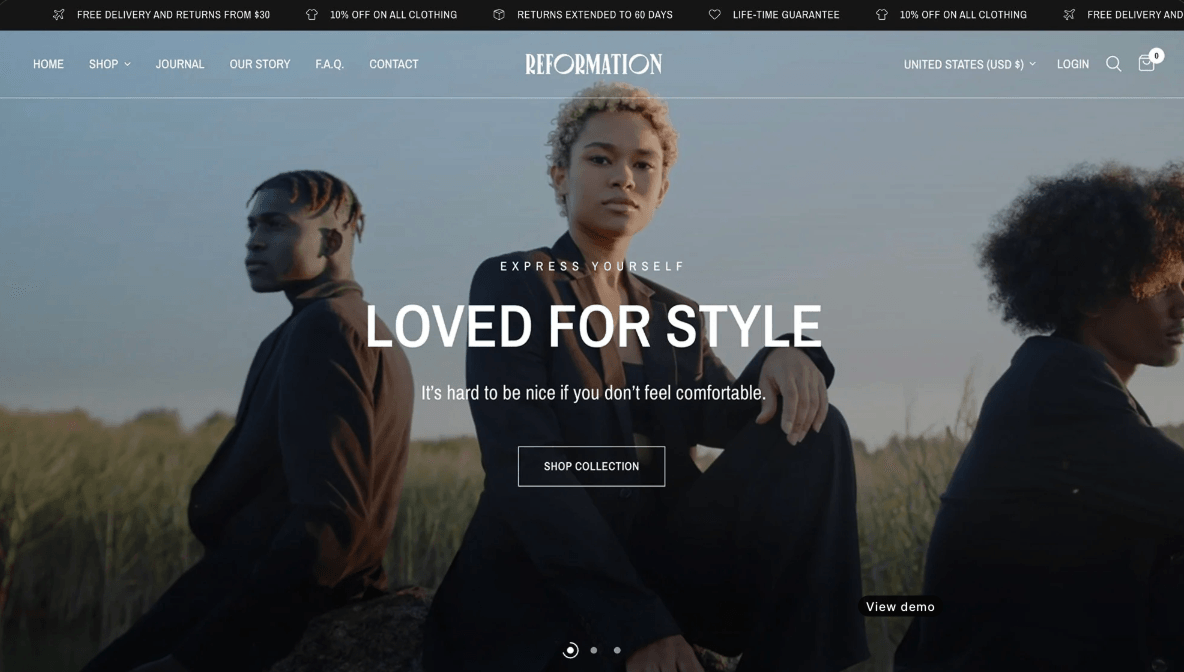
Reformation's positioning on the Shopify Theme Store emphasizes clean, conversion-focused layouts that work exceptionally well with product configurators. The theme's flexible sections and strong image handling capabilities support configurable products across various industries.
The layout patterns in Reformation create natural spaces for configurator widgets and option blocks without disrupting the overall page flow. This makes integration smoother and reduces the need for extensive template customization.
Typical merchant profiles that suit Reformation include fashion brands, home goods stores, and businesses selling personalized gifts where visual presentation directly impacts purchasing decisions. The theme's responsive design ensures that customization experiences remain smooth across all devices.
Impulse, Prestige, and Expanse
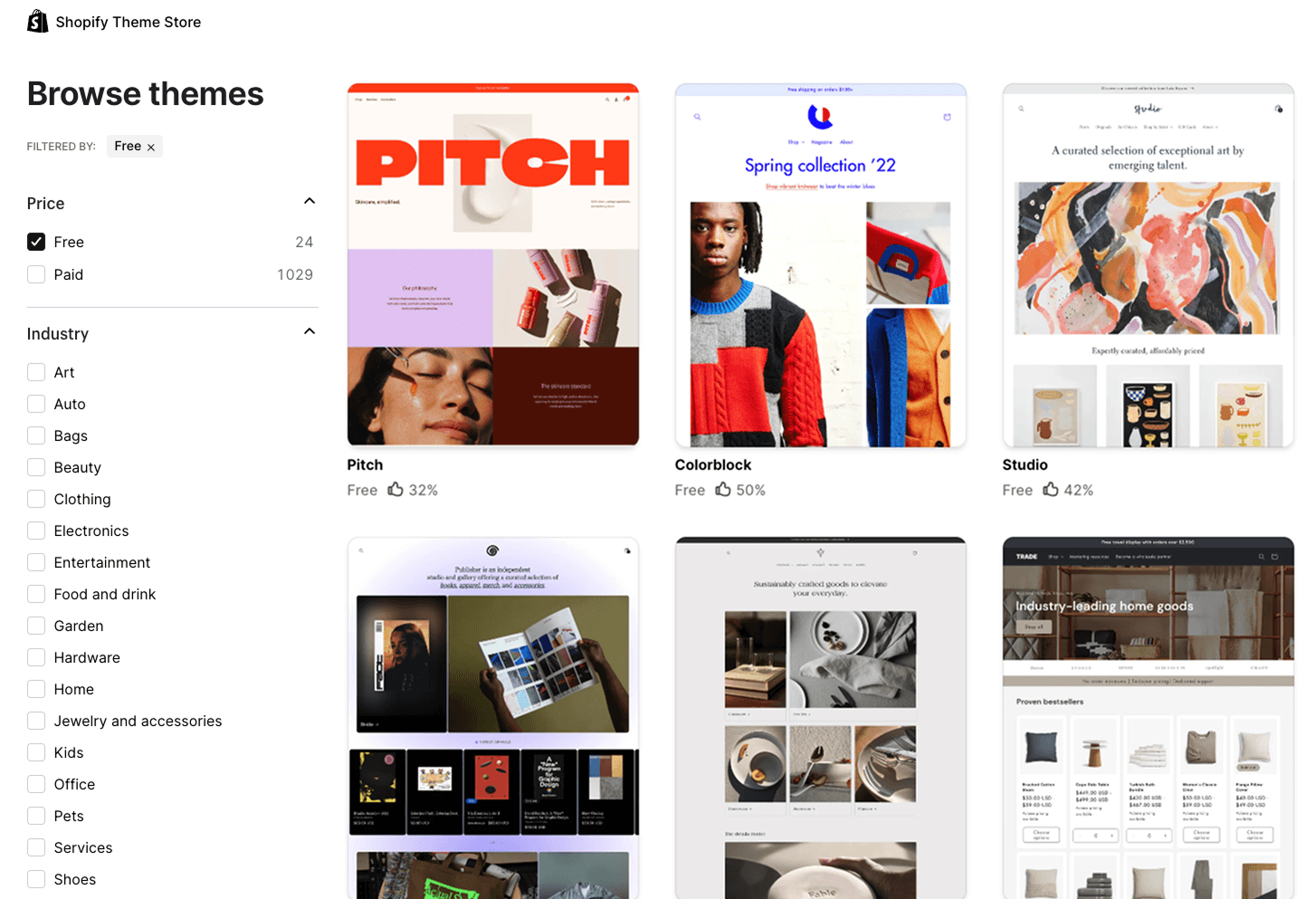
These popular premium themes share several characteristics that make them effective for custom products. Advanced product galleries, sophisticated collection merchandising, and mobile-friendly layouts optimized for conversion.
Each theme can support embedded custom product flows through different layout patterns. Impulse excels with full-width preview areas. Prestige offers elegant typography that complements configurator interfaces. Expanse provides flexible grid systems for complex option displays.
Choosing these themes over Dawn or other free shopify theme options makes sense when visual design quality directly impacts customer perception and conversion rates. Premium themes often include advanced features like predictive search, enhanced filtering, and optimized checkout flows that complement custom product experiences.
Why official Shopify themes and Shopify-approved themes work best with Kickflip
Kickflip's Shopify integration is specifically optimized for official Shopify themes and themes available in the Shopify Theme Store. This optimization provides several key benefits. Predictable code structure. Better compatibility with Kickflip's "Customize" button implementation. Smoother handling of cart properties for personalized products.
The integration process typically involves creating a dedicated product template, selectively hiding default product information sections, and positioning the configurator interface for optimal user experience. Official and approved themes follow consistent patterns that make these modifications more reliable and maintainable.
Kickflip's support team has extensive experience with these themes, enabling faster troubleshooting and more effective guidance when merchants need assistance with setup or customization. There is a real team behind the products ready to help you succeed with your customization strategy.
How to evaluate and test a Shopify theme for custom products
Using the Shopify Theme Store filters and demos
The Shopify Theme Store provides filtering options specifically for custom products and personalization use cases. These filters help you identify themes that other merchants have successfully used for similar applications.
When exploring demo stores, imagine where a configurator interface would naturally fit on the product page. Look for themes with clean product page layouts, adequate whitespace, and logical content flow that wouldn't be disrupted by adding customization controls.
Key indicators that a theme will work well for personalization include flexible product image areas, modular section layouts, and mobile-responsive design that maintains usability when additional interface elements are present.
Running a quick UX and speed audit before you commit
Simple performance checks using tools like Google Lighthouse and expert reviews that break down Lighthouse scores can reveal potential issues before you invest time in theme setup. Focus particularly on mobile viewport performance and scroll depth behavior on product pages.
Verify that buttons, navigation menus, and critical content remain easily accessible when a configurator interface is added to the page. Some themes become cluttered or difficult to navigate when additional elements compete for screen space.
Avoid themes bloated with unnecessary scripts, animations, or features that slow down page loading. Custom product experiences require responsive performance, so starting with a fast foundation is crucial for success.
Integration checklist for product customizers like Kickflip
Confirm where the "Customize" button will appear and how it replaces or complements the default "Add to cart" functionality. The button placement should feel natural and obvious to customers browsing your products.
Ensure that customized images and option selections pass correctly into the cart, mini-cart, and checkout flow. Test the entire purchase process to verify that personalized product details display properly throughout the customer journey.
Identify situations where you may need Shopify developer assistance for advanced theme modifications. While most integrations with approved themes are straightforward, complex customizations sometimes require professional development support. For detailed setup instructions and technical guidance, review the Kickflip Shopify integration documentation.
Implementing Kickflip with your chosen Shopify theme
Mapping your product pages and templates
Deciding which products need dedicated custom templates for the configurator requires careful planning of your product catalog structure. Not every product may need the full configurator experience, so creating targeted templates for customizable items maintains clean organization.
When hiding standard product information sections, consider which elements truly conflict with the configurator interface versus which can coexist. Sometimes selective hiding creates better experiences than completely replacing all default content.
Keeping product pages readable and conversion-focused becomes more challenging with many customization options. Focus on clear visual hierarchy, logical option grouping, and maintaining obvious paths to purchase completion.
Designing a configurator that fits your theme
Aligning Kickflip's visual style with your Shopify theme's typography, colors, and button designs creates a seamless user experience where the configurator feels like a natural extension of your store rather than an embedded third-party tool.
Ensuring clean, intuitive layouts on both desktop and mobile requires you to design a product configurator that responds to different screen sizes. Mobile users should never feel like they're using a cramped or difficult interface.
Kickflip's configurator theme editor provides detailed guidance for fine-tuning the configurator's appearance to match your chosen theme perfectly, ensuring brand consistency across the entire customization experience.
Real-world patterns from successful custom product stores
High-performing custom product merchants typically use a common page structure. Compelling hero imagery. Clear explanation of customization benefits. Prominently positioned configurator interface. Social proof elements that build confidence in the personalization process.
Positioning "Customize" versus "Add to cart" buttons requires strategic thinking about customer psychology and purchase intent. Some merchants find success with progressive disclosure, while others prefer immediate access to customization options.
Kickflip's experience across hundreds of themes has identified patterns that consistently improve conversion rates and reduce customer confusion during the personalization process.
Advanced considerations for custom product themes
Performance optimization for heavy customization
When implementing complex product configurators, theme performance becomes even more critical. The combination of dynamic preview generation, real-time pricing updates, and option management can strain themes that weren't optimized for interactive experiences.
Image optimization strategies become crucial when customers upload custom graphics or when configurators generate high-resolution previews. Themes should handle image processing efficiently without creating bottlenecks in the customization workflow.
Caching and asset delivery considerations help maintain fast loading times even as customization complexity increases. Themes with clean, modular code structures typically handle these performance demands more gracefully than heavily customized or bloated templates.
Scaling custom product catalogs
As your custom product offerings expand, theme flexibility becomes increasingly important. What works for a few customizable items may not scale effectively to hundreds of personalized products across multiple categories.
Template management strategies help maintain consistency while allowing for product-specific customization needs. Some products may require unique configurator layouts or specialized option presentations that standard templates can't accommodate.
Inventory and variant management through themes becomes complex when dealing with numerous customization options. Choose themes that handle large product catalogs gracefully and integrate well with Shopify's inventory systems.
International considerations
Multi-language support for custom product themes involves more than just translating static content. Configurator interfaces, option labels, and customization instructions all need localization capabilities.
Currency and pricing display becomes complex when dealing with dynamic pricing based on customization choices. Themes should handle multiple currencies smoothly while maintaining clear pricing communication throughout the personalization process.
Shipping and fulfillment considerations may influence theme choice when custom products have different delivery requirements than standard inventory items. Integration with shipping apps and fulfillment services becomes part of the overall theme ecosystem.
Transform your Shopify store with professional customization solutions
Choosing the right Shopify theme provides the foundation for successful custom product experiences. The magic happens when you pair that foundation with a sophisticated product configurator. The themes discussed in this guide offer the performance, flexibility, and compatibility needed to support advanced personalization features that turn browsers into buyers.
Whether you start with Dawn's solid free foundation or invest in premium themes like Motion or Reformation, the key is ensuring your chosen theme can handle real-time previews, dynamic pricing, and complex option management without compromising user experience. Official Shopify themes and approved Theme Store options provide the most reliable path to smooth configurator integration.
Kickflip specializes in transforming these carefully chosen themes into powerful customization platforms that drive engagement and increase average order values. Our Shopify integration works seamlessly with the themes recommended in this guide, providing the sophisticated personalization capabilities that modern customers expect while maintaining the fast, responsive performance that converts visitors into satisfied customers.
Ready to see how the right theme and configurator combination can transform your custom product business? Explore how Kickflip's Shopify integration can bring your chosen theme to life with professional-grade product customization features that scale with your business growth and exceed customer expectations for personalized shopping experiences.
Frequently asked questions
What are the best Shopify themes for custom products?
The best Shopify themes for custom products include Dawn (free), Motion by Archetype Themes, Reformation, Impulse, Prestige, and Expanse. These themes combine fast performance, flexible product page layouts, and clean code that makes them ideal for embedding product customizers, supporting live previews, and delivering smooth personalization experiences.
Can I use any Shopify theme with a product customizer like Kickflip?
Most Shopify Theme Store themes can work with product customizers. Official Shopify themes and Shopify-approved themes are the most reliable choices. These themes follow consistent coding standards that ensure smoother integration with configurator apps. Custom or heavily modified themes may require additional developer work to achieve proper compatibility.
Are free Shopify themes like Dawn good enough for custom product stores?
Free themes like Dawn can be excellent starting points for custom product stores, especially when testing concepts or working with limited budgets. Dawn provides solid technical foundations and Online Store 2.0 features that support configurator integration. However, premium themes often offer superior design quality, additional layout options, and enhanced mobile experiences that can improve conversion rates as your customization business grows.
How do Shopify themes affect the speed and UX of product customizers?
Shopify themes directly impact configurator performance through their code quality, asset optimization, and mobile responsiveness. Fast, lightweight themes enable smooth real-time previews and responsive customization interfaces. Heavy or poorly coded themes can cause preview delays, mobile UX problems, and integration difficulties that frustrate customers and reduce conversions.
Do I need a developer to integrate Kickflip with my Shopify theme?
Most integrations with official Shopify themes and approved Theme Store themes can be completed without developer assistance using Kickflip's App Embed system. However, complex customizations, heavily modified themes, or specialized layout requirements may benefit from professional development support to ensure optimal integration and performance.
Future reading
Customizable Products in Shopify - The Ultimate Guide
How to Write a Shopify Product Description that Sell
How to Improve Your Shopify Product Page
Share This article

Written by Édouard Grondin-Fortin
February 12th, 2026
Édouard is the Marketing Director at Kickflip, a product configurator for ecommerce brands. He works with merchants and agencies to implement product customization strategies that improve conversion rates and drive revenue growth. His expertise spans SaaS growth, ecommerce, and go-to-market strategy.


Maarten Luyckx
Osaka World
The user-friendly interface of Kickflip, combined with excellent customer service, ensured that this project was brought to a successful and beautiful conclusion.
Shopify App Store
May 20, 2021

Marie-Laetitia Rossazza
My Dust Bag
It took me a long time to find the perfect customizer app, and I’m so happy to say that I finally did! Kickflip is truly the best app on the market. The front end and back end are excellent, and the team behind it is incredibly kind and helpful!
Shopify App Store
September 1, 2023

Brad Jurga
All-Star Sporting Goods
Kickflip made everything easy, from designing the builder all the way through launch. We’re designing truly custom equipment for elite baseball players and this platform allows us to have better engagement and excitement around our brand. We’re seeing an instant return.
Shopify App Store
June 16, 2025

Kasper Taylor
CodedInk
My experience with both the product and the support team has been fantastic. The user interface and user experience are excellent. The features are powerful, and the WooCommerce integration is seamless and easy to set up.
G2.com
June 16, 2025

Saber Naceur
Vinylacy
By far, and I truly mean it, the best customizer available on Shopify. It’s easy to understand and manage, offers options for all types of products, and works extremely well. On top of that, it looks beautiful and feels premium. Highly recommended.
Shopify App Store
December 17, 2022

Jesus Guillermo de León Pérez
Dismo
Kickflip is a fantastic tool. It’s super intuitive, easy to use, and packed with capabilities. You don’t have to be an expert or have experience with other products to get started. The support team is also great and very responsive.
Shopify App Store
July 10, 2024

Frieder Urban
Era of Arc
We were looking for an uncomplicated configurator that was quick and easy to set up, offered plenty of design options, and worked reliably with fast loading times. We tested many configurators on the market, and with Kickflip, we found exactly what we needed.
Shopify App Store
October 10, 2024

John Taggart
Jack Harry and Ollie
What a great addition to our business Kickflip has been. It’s been fantastic to offer our customers the ability to personalize their orders. The support has been excellent, and we especially love that the pricing is tied to our success as customers make purchases.
Shopify App Store
May 7, 2021

TJ Garske
The Net Return
Kickflip saves our team a ton of time by eliminating the need to create custom mockups for customers. Customers can build their product themselves and place an order instantly, without any back-and-forth.
G2.com
January 26, 2026

Amin Hasani
CURVD
After extensive research into product customizer tools, we chose Kickflip for many reasons. We don’t like complicating simple tasks for customers, and Kickflip helped us simplify the process and create a seamless customer experience.
Shopify App Store
July 29, 2025