How to Add a Product Configurator to BigCommerce
Written by Marie Lamonde
November 11th, 2026

Table Of Contents
You sell products that are made to order. Custom jerseys, engraved gifts, furniture in the fabric your customer picks. BigCommerce gives you product options to sell them, but at some point a few dropdowns stop being enough. Shoppers can't see what they're ordering, your team spends hours on mockups and emails, and every new option makes your catalog harder to manage.
That's where a BigCommerce product configurator comes in. In this guide, you'll learn what a configurator is, when you need one, the three ways to add one to your store, and how to set one up step by step.
What is a BigCommerce product configurator?
A BigCommerce product configurator is a tool that lets shoppers build their own version of a product, right on your store. They choose from options you define (colors, materials, components, text, logos) and see a live preview of their design as they go. The price updates in real time with each choice, and every detail is saved with the order so your team can produce it.
You may also hear it called a product customizer or a product personalizer. The terms overlap: customization usually means personal touches like names and logos, while configuration means choosing components and specs. A good configurator handles both.
Product configurator vs. BigCommerce product options
BigCommerce already has a native way to sell products with choices. It splits product options into two families, variants and modifiers:
Variants are distinct versions of a product, like a small red shirt. Each variant gets its own SKU, and BigCommerce allows up to 600 variants per product.
Modifiers let customers personalize or add onto a product, like a name engraved on a mug. They don't get their own SKU, and they can add to the price through rules.
These tools work well for simple catalogs. What they don't give you is a visual experience. Shoppers pick options from a list and have to imagine the result. A product configurator sits on top of your product page and shows customers exactly what they're building before they buy.
When BigCommerce's native product options aren't enough
Not every store needs a configurator. If you sell a t-shirt in three sizes and four colors, variants do the job. But if any of these sound familiar, you've likely outgrown native options:
Too many combinations. Five option groups with five choices each is already 3,125 combinations, well past the 600-variant limit. Managing a SKU for each one isn't realistic.
Shoppers can't see what they're ordering. A dropdown that says "Navy" doesn't show a navy jacket with a white logo and gold stitching. Uncertain buyers abandon carts or return products.
Customers want to add their own touch. Names, numbers, engraving, or an uploaded logo need to be placed and previewed on the product, not just typed in a text field.
Some options depend on others. A certain fabric only comes in certain colors, or a component only fits one frame size. Without conditional logic, customers can order combinations you can't make.
Your team is drowning in mockups. If every custom order means emails, calls and manual proofs, your order process won't scale with your sales.
Production needs clean files. Your team needs exact specs and print-ready artwork for every order, not a screenshot and a note.
Custom sportswear brand V-Nation used to spend 60 to 120 minutes on emails, calls and mockups for every custom uniform order. After launching a configurator, its sales tripled and order processing time dropped by about 80% (read the V-Nation story).
3 ways to add a product configurator to BigCommerce
1. Push native options as far as they go
You can get more out of BigCommerce product options with shared options, swatches for colors, text field modifiers for personalization and price adjustment rules. Some Stencil theme developers can also add custom code to swap product images when an option changes.
This route costs little and keeps everything in your BigCommerce admin. But you still won't get a true live preview, logic between options stays limited, and each new product means more manual setup.
2. Build a custom configurator
With a developer or an ecommerce agency, you can build a configurator from scratch on top of BigCommerce's APIs. You get full control over the experience and can match any product logic.
The trade-off is time and money. Custom builds usually take months, cost tens of thousands of dollars, and need a developer every time you add a product, change an option or update your theme.
3. Install a configurator app
The BigCommerce App Marketplace has apps built specifically for product customization. A configurator app gives you a visual builder, a live preview, dynamic pricing and order data without writing code. You can usually launch in days, and the app provider maintains the software for you.
The main thing to check is fit: make sure the app supports your theme, your product complexity and your production workflow (more on that below).
Comparison: which method is right for you?
For most growing brands, an app is the fastest path to a premium experience without the overhead of a custom build. Try Kickflip free on BigCommerce and see how your products look in a configurator.
How to add a product configurator to BigCommerce (step by step)
Here's how to set up a configurator with an app, using Kickflip as the example. Kickflip works with BigCommerce stores that use a Stencil theme. Headless storefronts aren't supported yet.
Step 1: Install the app from the BigCommerce App Marketplace
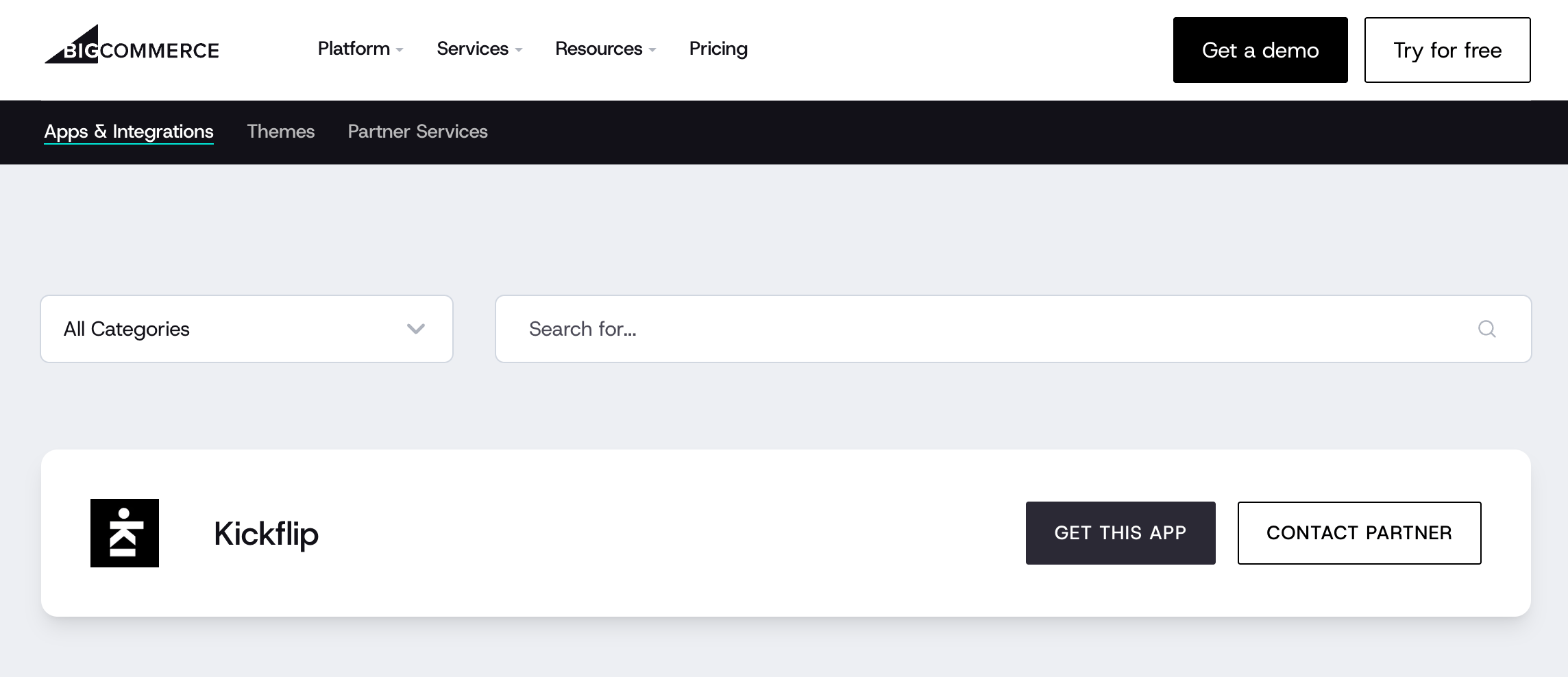 In your BigCommerce admin, open the App Marketplace, search for Kickflip and click Install. Connect your store and create your Kickflip account. You start with a 14-day free trial. The installation guide walks you through each screen.
Step 2: Prepare your product images
Your configurator is only as good as its visuals. Each customizable part of the product should be its own transparent PNG layer, and all images for one product should be the same size (1200 × 1200 px is a good default). To offer many colors, use one desaturated (white or gray) base image and let the configurator apply colors on top, instead of shooting a photo for every color.
Step 3: Build your configurator
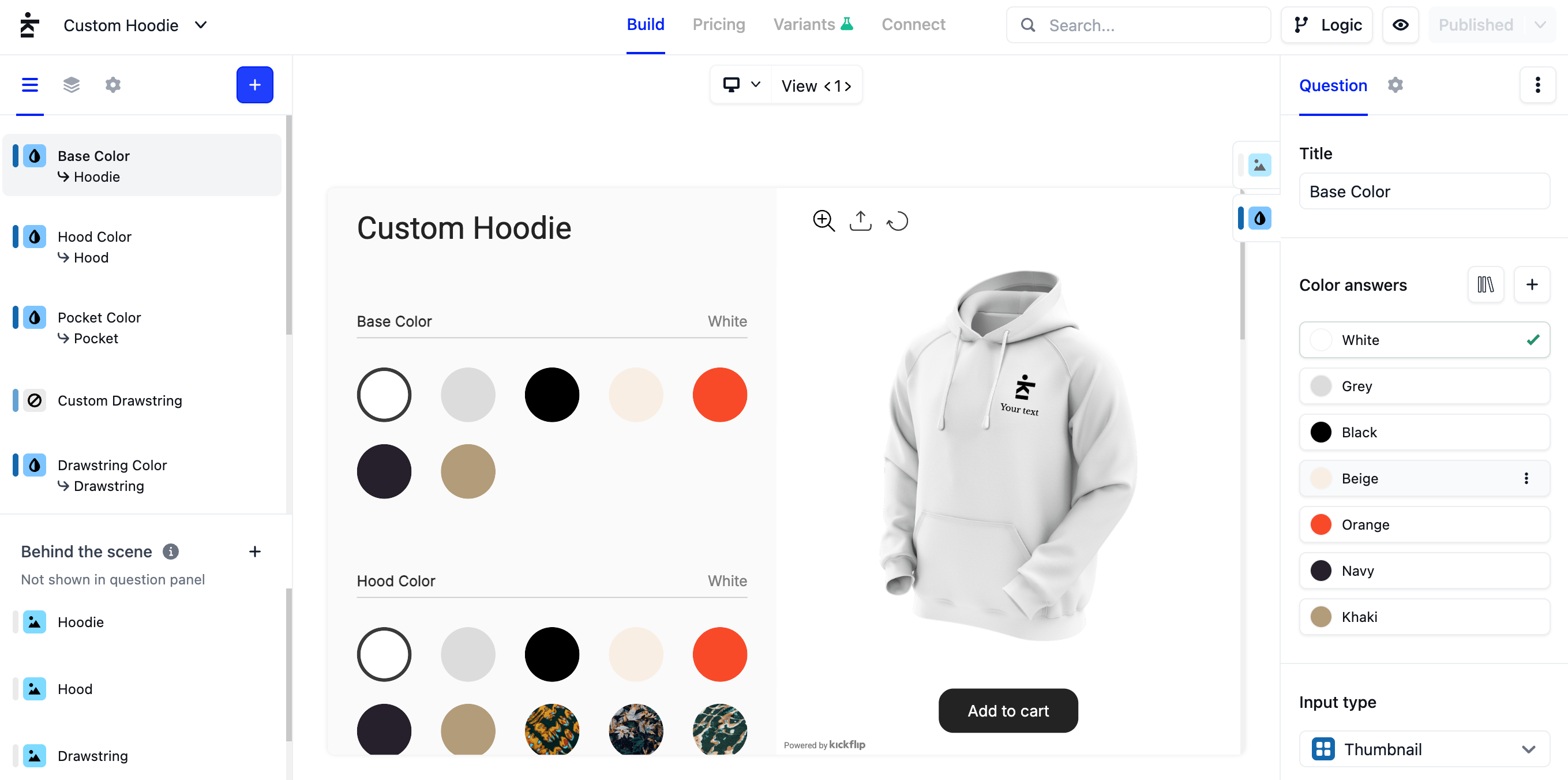 In Kickflip's no-code product builder, create your product and add questions (like "Choose your frame color") and answers (the choices). For each question, choose how shoppers interact with it: a color swatch, a dropdown, a text field in your custom fonts, or a logo upload they can move and resize on the product. Add logic rules so shoppers can only build combinations you can produce, and pre-made designs they can start from.
Step 4: Set your pricing
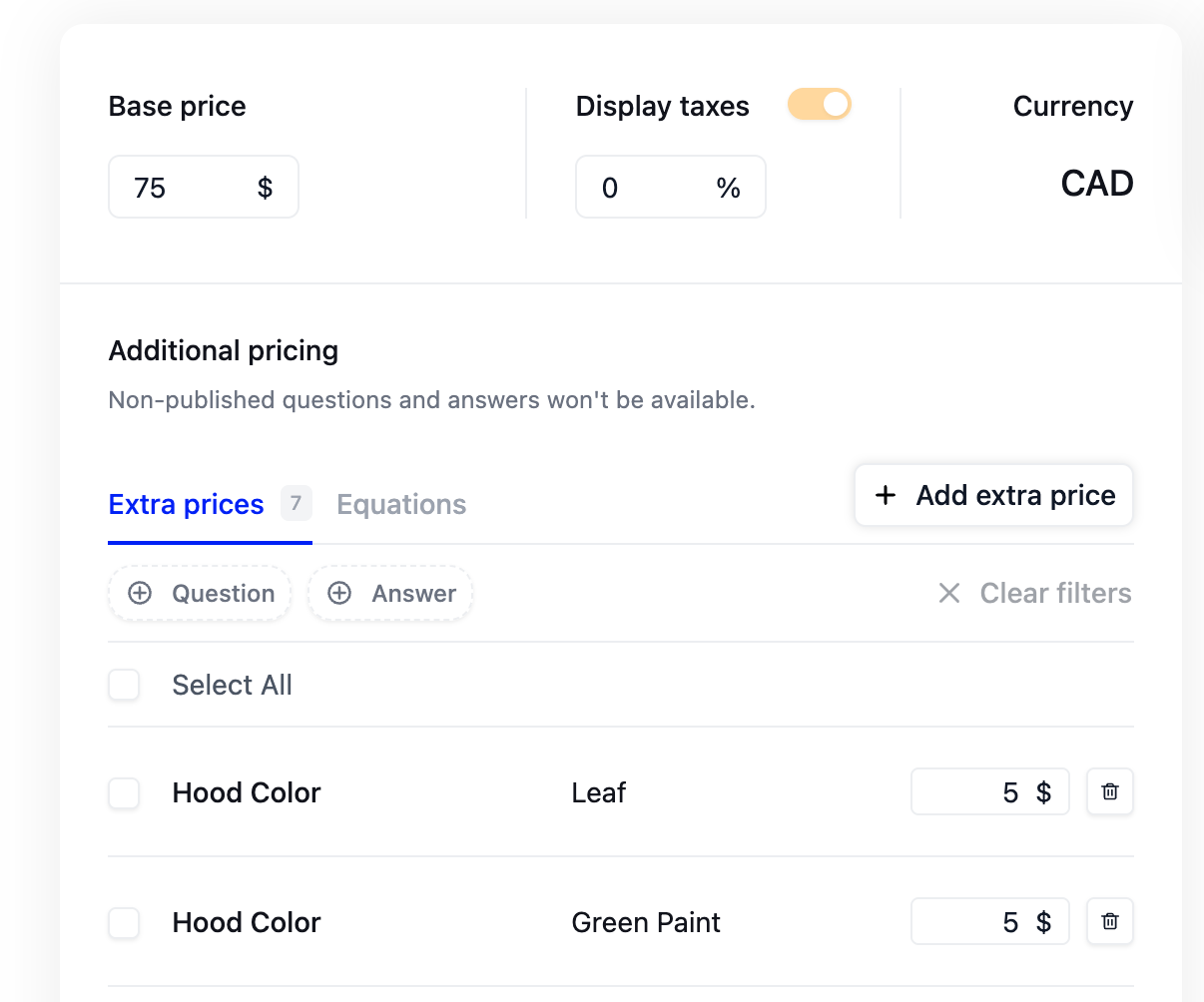 Set a base price for the product, then add a price for each option that costs more. You can also offer bulk pricing so the price per unit drops as quantity goes up. Shoppers see the total update in real time as they customize.
Step 5: Match the look to your brand
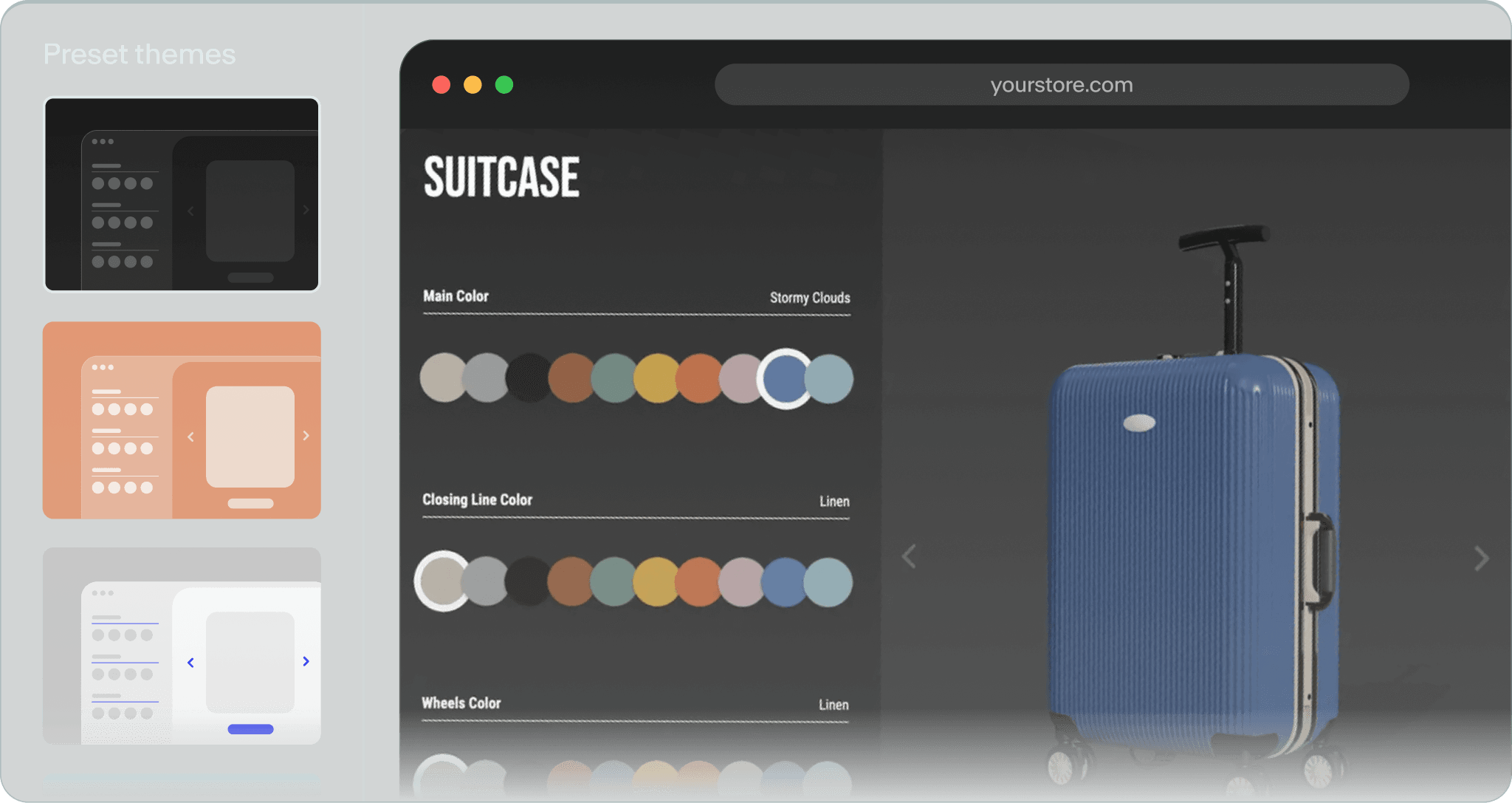 Customize the configurator's theme so it fits your store, and rename any interface text to match your brand voice. If you sell in several countries, translate the configurator into the languages you sell in.
Step 6: Publish and connect to BigCommerce
Publish your configurator and connect it to your store in one click. Kickflip creates the product in your BigCommerce catalog with its base price and preview image. It starts hidden, so you can make it visible when you're ready to sell. Note that each configurator creates a new product: linking it to a product already in your catalog isn't available yet.
Step 7: Choose where the configurator appears
You have two options. Replace your theme's Add to Cart button with a Customize button that opens the configurator in a popup (you choose the label, size and corner radius), or show the configurator directly on the product page. Kickflip detects your theme's Add to Cart button on its own. If your theme is heavily customized, Advanced mode lets you set the placement yourself.
Step 8: Test, then go live
Before you make the product visible, place a test order from a phone and a desktop. Check that the cart shows the design image and the right price, and that customers can go back to edit their design from the cart. Then confirm the order appears in your Kickflip dashboard with the full design and its print-ready files. Order statuses stay in sync with BigCommerce, so shipped and cancelled orders update automatically.
What to look for in a BigCommerce configurator app
Not all apps are built for the same products. Before you install one, check that it offers:
A real-time visual preview that updates with every choice, ideally from several angles
Conditional logic so customers can't build combinations you can't produce
Personalization tools: text in your own fonts, logo and image upload, placement on the product
Dynamic pricing, including per-option prices and bulk discounts
Order data your team can use: a full design summary and print-ready files with every order
No-code setup so your marketing or product team can add products without a developer
Compatibility with your theme, and clear documentation on what's supported
Fast loading on mobile, since a growing share of shoppers will design on their phones
Translations if you sell in more than one language
Human support to help you through your first build
You can explore Kickflip features or browse configurator examples by industry to see what's possible.
Best practices for a configurator that converts
Guide, don't overwhelm. Group questions into clear steps and keep the most important choices first.
Set smart defaults. Start shoppers from a good-looking design, or offer a few pre-made designs they can tweak.
Optimize your images. Compress your PNGs so the configurator loads quickly, especially on mobile.
Show the price as it changes. Transparent pricing builds trust and avoids surprises at checkout.
Let shoppers review before they buy. A summary of every choice before Add to Cart reduces mistakes and returns.
Use your configurator in marketing. Show it in ads, emails and social posts. It's proof of the premium experience you offer.
Start selling custom products on BigCommerce
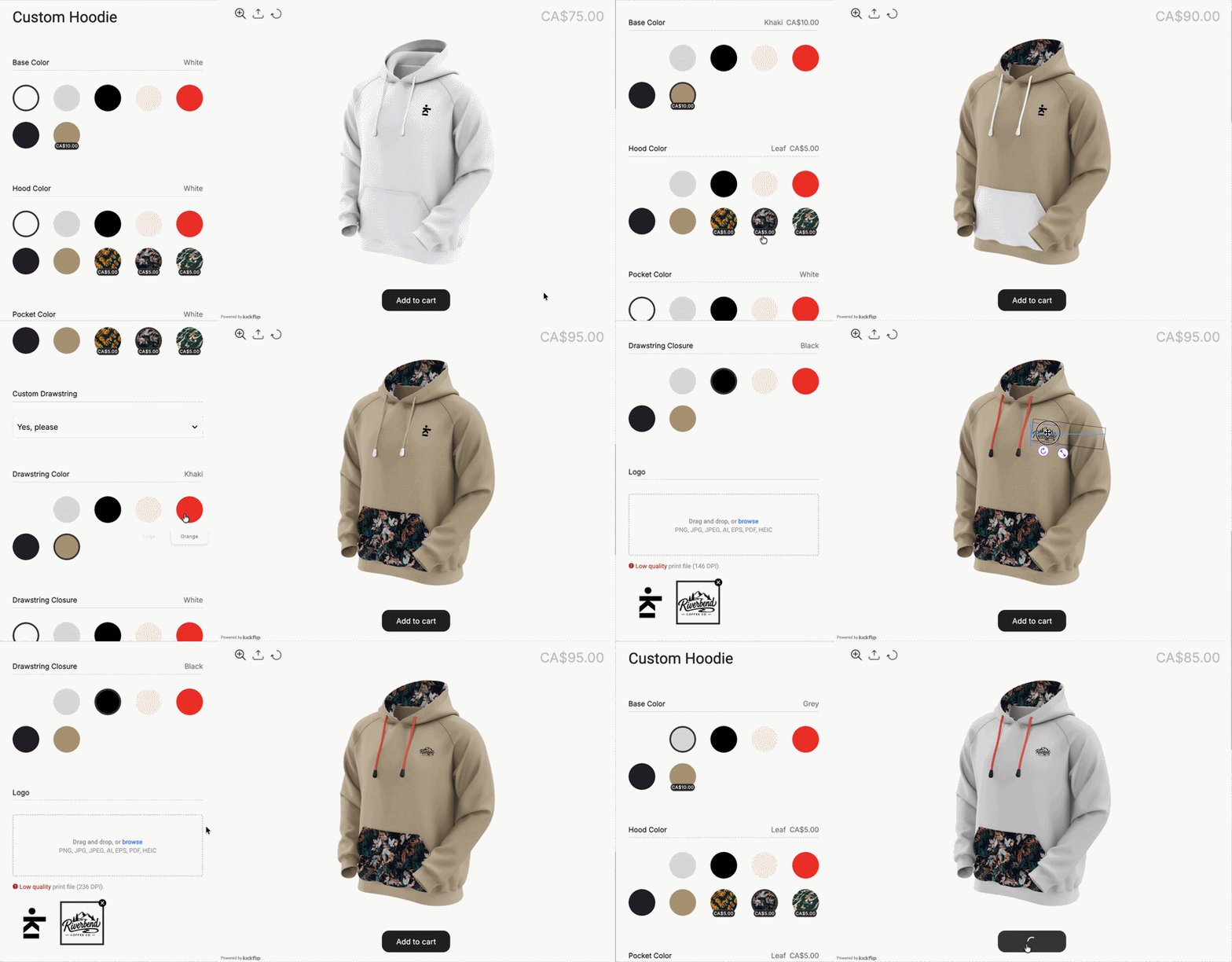 BigCommerce's product options are a solid start, but they weren't built for made-to-order products with live previews, personal touches and complex rules. A product configurator closes that gap. It turns your product page into a design studio, gives shoppers the confidence to buy, and sends your team everything it needs to produce each order right the first time.
If you're ready to grow your custom product sales, install Kickflip from the BigCommerce App Marketplace and start your 14-day free trial. Want to see it in action first? Explore our demo stores or learn more about the Kickflip BigCommerce product customizer.
BigCommerce product configurator FAQ
Does BigCommerce have a built-in product configurator?
No. BigCommerce offers native product options (variants and modifiers) that let shoppers pick sizes, colors or add text. It doesn't include a visual configurator with a live preview. For that, you need an app from the BigCommerce App Marketplace or a custom build.
What's the difference between BigCommerce product options and a product configurator?
Product options are choices shoppers select from a list, like a dropdown or swatches. A product configurator adds a live visual preview, logic between options, real-time pricing and production-ready order data. Options tell you what the customer picked; a configurator shows the customer what they're buying.
Can customers upload a logo or add custom text on BigCommerce?
Natively, you can add a text field or a file upload as a modifier, but the customer won't see their text or logo on the product. With a configurator app like Kickflip, customers can type text in your custom fonts, upload their logo, and position it on the product in a live preview.
How much does a BigCommerce product configurator cost?
It depends on the method. Native options are included in your BigCommerce plan. A custom build typically costs tens of thousands of dollars plus ongoing developer time. Configurator apps usually charge a monthly plan, sometimes with a small fee per custom product sold. See Kickflip's pricing for details.
Do I need a developer to add a product configurator to BigCommerce?
Not with a no-code app. You build the configurator visually and connect it to your store in a few clicks. A developer only helps if your theme is heavily customized and you want to fine-tune where the configurator appears.
Will a configurator work with my BigCommerce theme?
Most configurator apps work with Stencil themes. Kickflip supports Stencil themes and detects your Add to Cart button automatically. Headless storefronts aren't supported yet.
Future reading
What Is BigCommerce? Complete Ecommerce Guide for 2026
Best BigCommerce Alternatives
How to Build a Product Configurator
Share This article

Written by Marie Lamonde
November 11th, 2026
Marie Lamonde is a Content Marketing Manager at Kickflip with 8 years of experience writing about digital marketing, SaaS, and ecommerce. She specializes in creating clear, search-driven content that attracts, engages, and converts.


Maarten Luyckx
Osaka World
The user-friendly interface of Kickflip, combined with excellent customer service, ensured that this project was brought to a successful and beautiful conclusion.
Shopify App Store
May 20, 2021

Marie-Laetitia Rossazza
My Dust Bag
It took me a long time to find the perfect customizer app, and I’m so happy to say that I finally did! Kickflip is truly the best app on the market. The front end and back end are excellent, and the team behind it is incredibly kind and helpful!
Shopify App Store
September 1, 2023

Brad Jurga
All-Star Sporting Goods
Kickflip made everything easy, from designing the builder all the way through launch. We’re designing truly custom equipment for elite baseball players and this platform allows us to have better engagement and excitement around our brand. We’re seeing an instant return.
Shopify App Store
June 16, 2025

Kasper Taylor
CodedInk
My experience with both the product and the support team has been fantastic. The user interface and user experience are excellent. The features are powerful, and the WooCommerce integration is seamless and easy to set up.
G2.com
June 16, 2025

Saber Naceur
Vinylacy
By far, and I truly mean it, the best customizer available on Shopify. It’s easy to understand and manage, offers options for all types of products, and works extremely well. On top of that, it looks beautiful and feels premium. Highly recommended.
Shopify App Store
December 17, 2022

Jesus Guillermo de León Pérez
Dismo
Kickflip is a fantastic tool. It’s super intuitive, easy to use, and packed with capabilities. You don’t have to be an expert or have experience with other products to get started. The support team is also great and very responsive.
Shopify App Store
July 10, 2024

Frieder Urban
Era of Arc
We were looking for an uncomplicated configurator that was quick and easy to set up, offered plenty of design options, and worked reliably with fast loading times. We tested many configurators on the market, and with Kickflip, we found exactly what we needed.
Shopify App Store
October 10, 2024

John Taggart
Jack Harry and Ollie
What a great addition to our business Kickflip has been. It’s been fantastic to offer our customers the ability to personalize their orders. The support has been excellent, and we especially love that the pricing is tied to our success as customers make purchases.
Shopify App Store
May 7, 2021

TJ Garske
The Net Return
Kickflip saves our team a ton of time by eliminating the need to create custom mockups for customers. Customers can build their product themselves and place an order instantly, without any back-and-forth.
G2.com
January 26, 2026

Amin Hasani
CURVD
After extensive research into product customizer tools, we chose Kickflip for many reasons. We don’t like complicating simple tasks for customers, and Kickflip helped us simplify the process and create a seamless customer experience.
Shopify App Store
July 29, 2025