Best product configuration tools for 2026: The ultimate e-commerce guide
Written by Marie Lamonde
June 19th, 2026

Table Of Contents
Why product configuration tools define e-commerce growth in 2026
Looking to grow your revenue with customizable products but worried about complexity? You're in the right place. The question isn't whether to offer personalization: your customers already expect it. The real question is whether your current setup can deliver it without turning your operations into a manual bottleneck.
The e-commerce customization landscape in 2026 looks completely different compared to what merchants were working with five years ago. What used to be a dropdown menu and a text field has evolved into something closer to a design studio embedded directly in the storefront: real-time visual feedback, multi-angle previews, instant pricing recalculations, and automated handoffs to production. The shift from static, flat option selectors to immersive, workflow-connected customization engines didn't happen in slow increments. It surged as consumer expectations outpaced legacy tools. You want to give them an experience that keeps them engaged.
Product configuration tools are software applications that enable customers to customize products in real-time by selecting colors, materials, components, and text directly on an e-commerce storefront. As each choice is made, the tool dynamically updates the product visual, the price, and the manufacturing specification. The customer sees exactly what they're buying before they commit. No guesswork. That try-before-you-buy loop is no longer a luxury: it's a baseline expectation in premium product categories.
What makes 2026 different is the operational layer. The best tools don't just render a pretty preview. They generate print-ready production files, automate bill-of-materials outputs, and pass structured order data directly into fulfillment workflows. That's the gap between a front-end widget and a genuine business infrastructure tool.
Why product configuration is critical in 2026
Custom products carry higher margins. That's understood. But here's the deal: the real argument for investing in a serious product configuration tool is operational. Without automation connecting the customer's design choices to your production workflow, every custom order is a manual task. At low volume, that's manageable. At scale, it strangles your growth.
Modern commerce has reshaped customer expectations. Mobile-first shoppers, who now represent the majority of e-commerce traffic, expect instant visual feedback. A configuration experience that lags, breaks on mobile, or requires a page reload to reflect a color change will lose the sale. The interface is the product, in a very real sense.
Automation closes that loop. When a customer finalizes their configuration and checks out, the right tool has already generated the print-ready production file, updated the corresponding inventory record in real-time, and queued the order directly for fulfillment. No human intervention needed. That's how brands scale custom product lines without increasing operational headcount.
The hard data behind visual customization
The market is pouring serious capital behind this category. The global product configurator software market is valued at approximately USD 1.28 billion in 2026. It is growing at a 7.8% CAGR through 2035 (Business Research Insights, 2026). Broader market definitions, which include enterprise CPQ and industrial parametric tools, push that figure to USD 6.972 billion by 2035 (Market Research Future, 2025).
The B2C deployment segment is the fastest-moving part of this market. The momentum is real. It accounted for 45.7% of global deployment revenue in 2025 and is projected to expand at an 11.2% CAGR through 2034 (Dataintelo, 2025). That growth rate reflects what merchants are already experiencing at the storefront level: visual customizers consistently produce a 20% to 60% conversion rate lift over static product pages, depending on product category and execution.
Return rates tell a similarly compelling narrative. Real-time 2D and 3D visualization reduces product returns by 15% to 40% because the visual preview closes the gap between what a customer imagined and what arrives at their door. For merchants in markets like Australia and New Zealand, where high shipping costs make returns genuinely punishing, that reduction alone justifies the investment.
Key features to look for in a product configuration tool
Visual quality and real-time rendering
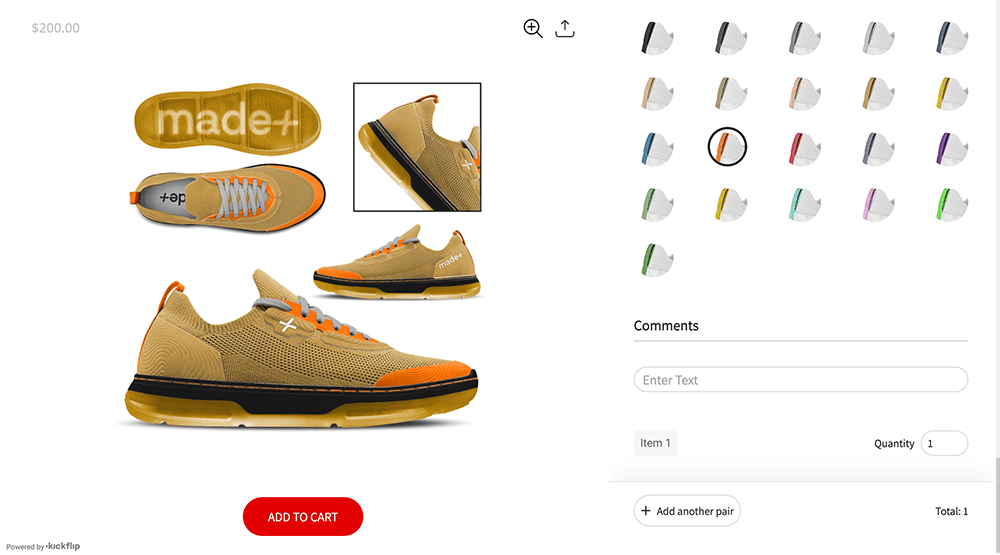
Visual quality is where the customer experience either holds together or falls apart. First impressions matter. A configurator can have every feature on this list and still underperform if the rendered output looks cheap or loads slowly.
The choice between high-quality 2D multi-angle layering and interactive 3D rendering isn't always obvious. 3D models are visually impressive, but they carry a real cost: asset creation time, file size, and rendering performance on mid-range mobile devices. High-quality 2D layers, which are transparent PNGs composed in real-time, can produce a premium experience for customers that loads in a fraction of the time. For most DTC product categories,For most DTC product categories, fast 2D visuals will usually outperform slow 3D experiences. While well-executed 3D can lift conversions, that advantage can quickly disappear if the experience adds lag, slows down the product page, or creates friction on mobile. In practice, a speedy 2D configurator often beats a richer 3D experience that loads or responds too slowly.
The visual asset creation chokepoint is real and underreported. Building the layer sets, precise masks, and angle-specific images requires either a highly skilled designer or an intuitive tool that simplifies the process enough that any non-technical team member can manage it on their own. If your configurator requires a dedicated 3D artist to update a single color option, your speed-to-market advantage vanishes and it’ll take longer to expand your catalog.
Fast load times aren't optional. Bounce rates on mobile product pages climb steeply after three seconds. A configurator that adds latency to your product page is actively costing you conversions.
Advanced conditional logic and rules engines
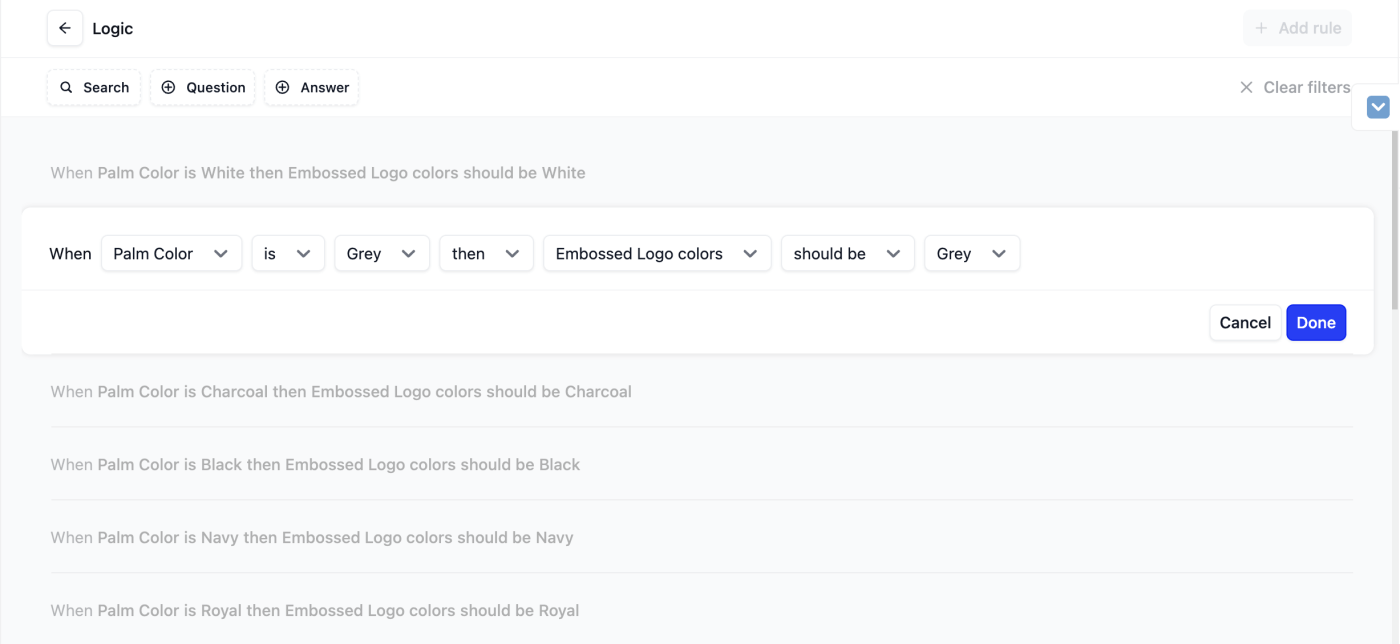
Conditional logic is the mechanism that makes a configurator commercially feasible rather than just visually interesting. It's the ability to show or hide options dynamically based on what a customer has already selected. For example, a customer configuring a custom sneaker can't accidentally pair a sole designed for one base model with an upper from a different one.
A strong rules engine handles several tasks at once. It prevents customers from building invalid configurations, which protects your brand from fulfillment errors and the customer support spiral that follows. It manages SKU-specific option sets at scale without requiring custom code for every new product variant. And it drives higher order value by surfacing relevant upsell options, such as premium materials, add-on components, and personalization tiers, at the precise moment in the configuration flow when they're most relevant.
Dynamic pricing is the commercial output of this logic layer. It builds trust. As each option is selected, the price updates instantly and transparently. Customers who can see exactly what each upgrade costs are more likely to choose it than customers who encounter a surprise price change at checkout.
3. Platform integrations and headless compatibility
A configurator that doesn't integrate cleanly with your store's systems creates more problems than it solves. It must connect with checkout, inventory, and order management. Native integration with Shopify and WooCommerce is the baseline requirement for most DTC brands. You need more than just embedding the interface: you need to pass custom order data, selected options, and dynamic SKU information directly into the cart and backend.
Scaling brands increasingly operate on custom or headless technical stacks. They need flexibility. A configurator with a well-documented API and genuine headless compatibility isn't a nice-to-have for those teams; it's a non-negotiable must-have. The tool also needs to handle localized tax calculations, multi-currency pricing, and multi-language display if you're selling across borders, which, in 2026, most growth-stage brands are.
A frictionless user experience is the baseline requirement for most DTC brands. GDPR and CCPA compliance matters here too, particularly for configurators that handle user-uploaded images or personalized text. European merchants operating under the strict guidelines of the European Accessibility Act of 2025 also need to confirm that their configurator interface is fully keyboard-navigable and compatible with standard screen-readers.
4. Downstream production and fulfillment automation
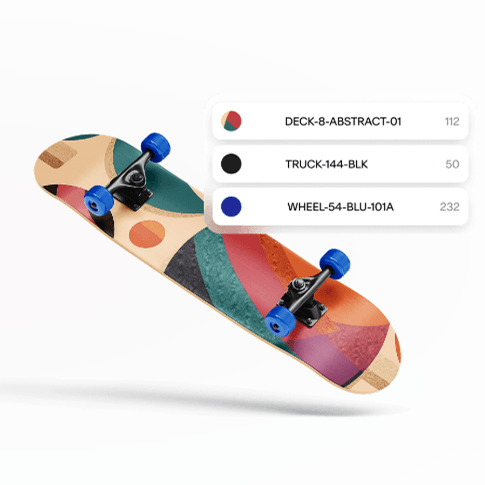
The configurator's job doesn't end at checkout. What happens between 'order confirmed' and 'production started' is where most custom product operations either run efficiently or pile up costly manual steps.
Automatic generation of print-ready production files, including high-resolution SVG or PDF exports that go directly to your manufacturing partners, completely eliminates a manual transcription step that is both time-consuming and highly error-prone. Automated Bill of Materials (BOM) generation takes that further, producing structured component lists that feed directly into inventory and procurement workflows.
The downstream effect on customer support is highly quantifiable. When production files are generated automatically and accurately, the back-and-forth between customers and support teams, such as: 'Can you confirm the exact color you selected?', virtually vanishes. Fewer errors mean fewer tickets. Fewer tickets mean your support team can focus on genuinely complex issues rather than order clarification.
Top product configuration tools for 2026
Independent evaluations, like the SwiftOtter Review, frequently underscore the technical trade-offs between mid-market and enterprise tools. Choices matter.
1. Kickflip: Best overall for e-commerce and DTC brands
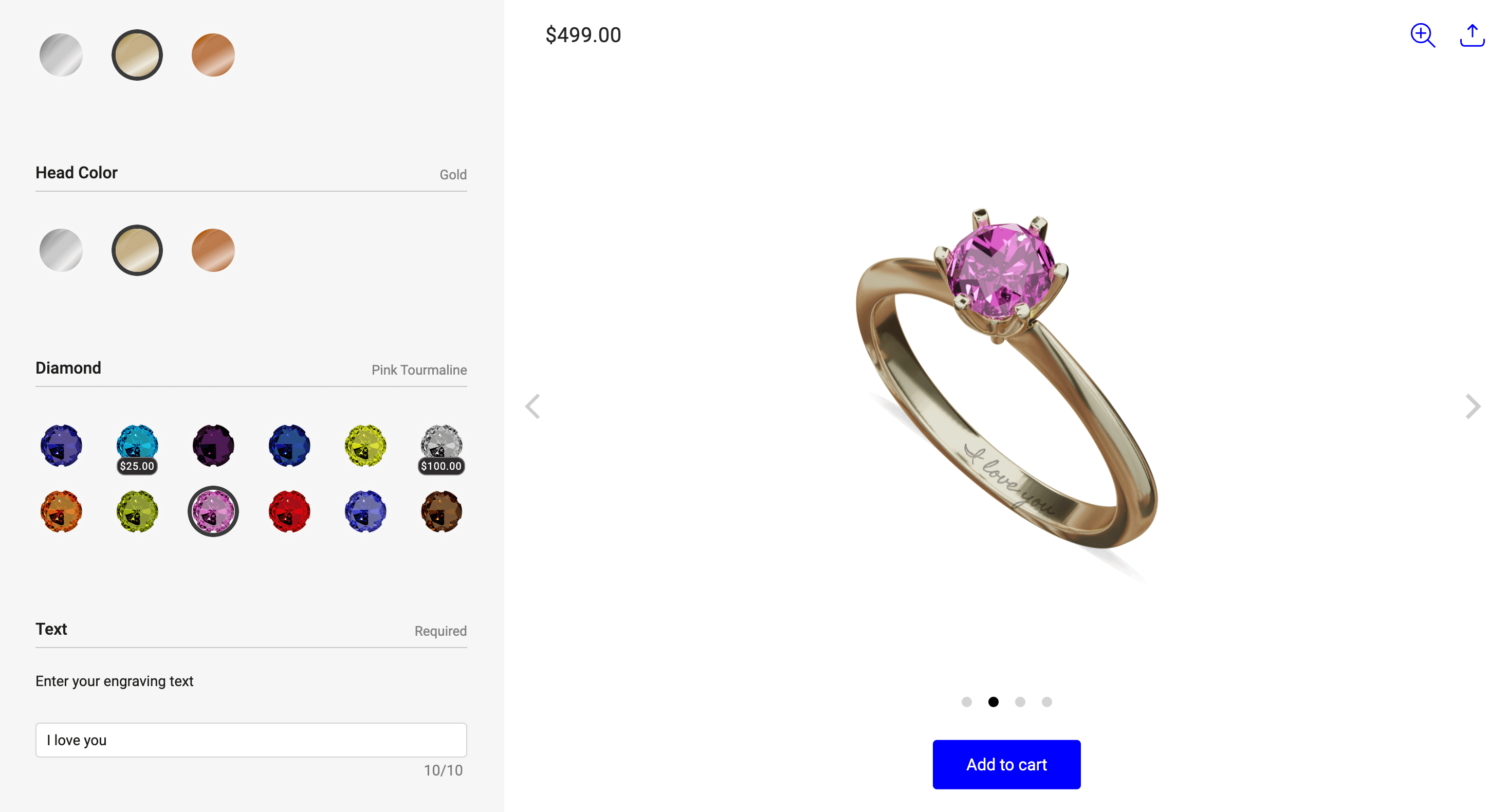
Kickflip has been building product customization tools since 2010, and the platform reflects that depth of experience in ways that are immediately apparent when you start configuring a product. It is the most capable customizer for Shopify brands, WooCommerce and Wix stores. Here's the deal: it occupies a specific, intentional position in the market. It is far more capable than cheap widget-style tools, yet much more accessible than enterprise CPQ platforms that require a six-figure budget and a dedicated development team.
The visual output is genuinely premium. Real-time multi-angle previews, transparent PNG layer compositing, and precise image masking produce a configuration experience that reflects high-end branding without requiring a 3D artist on staff. Brands across sporting goods, footwear, furniture, jewelry, electronics, and apparel, including established names like Suunto and Dick's Sporting Goods, have deployed Kickflip to deliver exactly this kind of experience at scale.
The conditional logic engine handles unlimited customization options without degrading visual performance. Compatible parts lock together automatically; invalid configurations are blocked before a customer can select them. That rules layer is what separates a configurator that looks good from one that genuinely protects your fulfillment operation.
Pricing is structured to align with incoming revenue rather than penalize growth. The Scale plan starts at $59/month, with a transaction fee that begins at 1.95% and decreases as volume increases, reaching 0% at higher tiers. For a startup testing a custom product line, that model carries minimal financial risk. For a scaling brand processing significant volume, the fee structure becomes increasingly advantageous.
The merchant performance data is specific. After implementing Kickflip, brands saw conversion rates climb from 2.4% to 3.5%: a 46% uplift. Average order values moved from $84 to $110, a 31% increase, as customers engaged with premium configuration options they could see and price in real-time. Return rates dropped from 8.2% to 4.1%: a 50% reduction. Why? Because the visual preview eliminated the expectation gap that drives returns. Customer support tickets fell by 22%, and average product customization launch times compressed from eight weeks to under two.
Those aren't abstract projections. They're the operational reality for brands that have moved from static product pages to a properly implemented Kickflip configuration experience.
2. Zakeke: Best for multi-platform 3D and virtual try-on
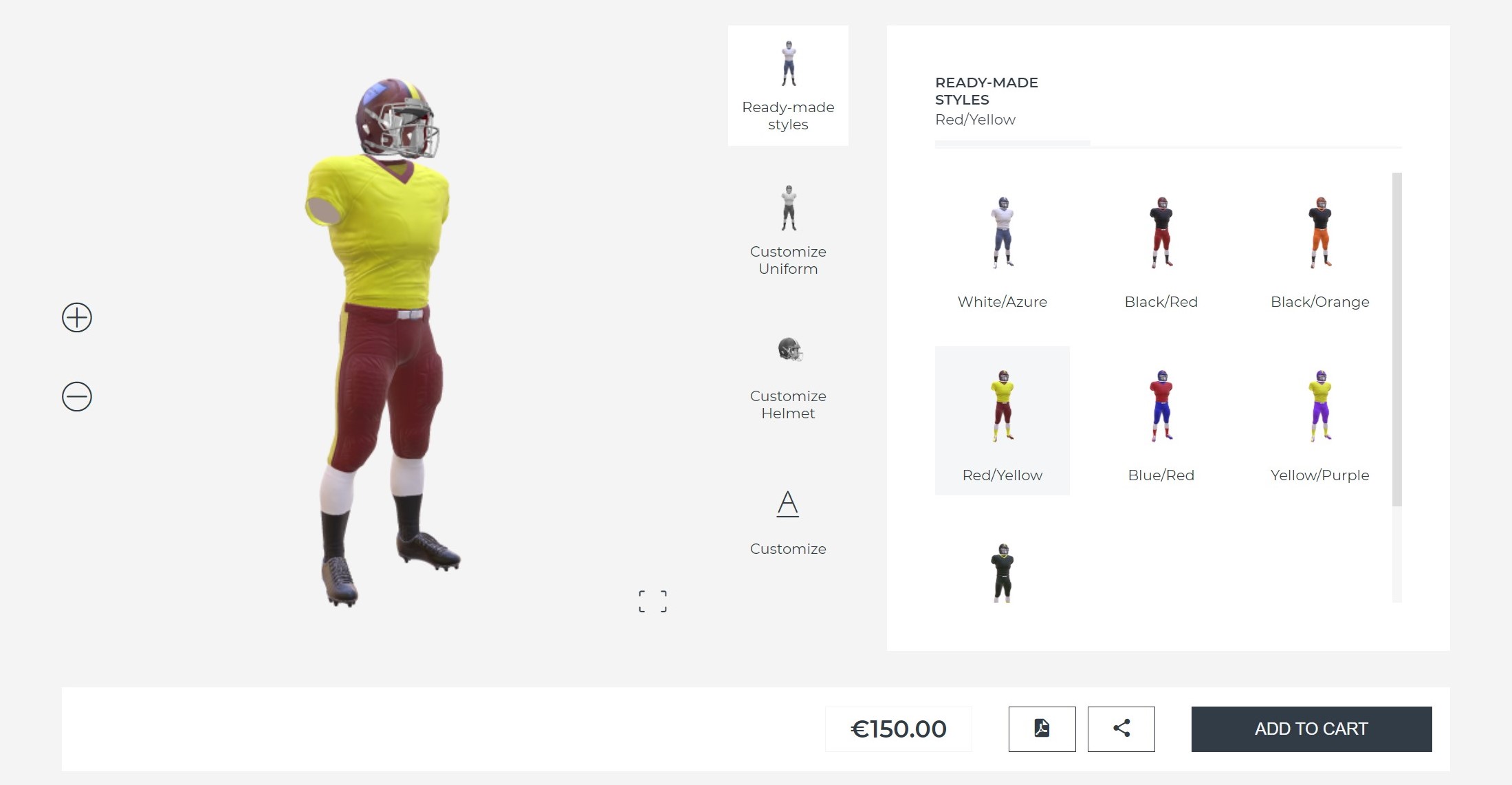
Zakeke is a product configurator in the 3D and AR customization space, with strengths in Virtual Try-On (VTO) for categories like eyewear and accessories. It supports Shopify, WooCommerce, and custom integrations, which gives it reasonable platform reach.
The trade-offs are real, though. The backend configuration is more complex than most non-technical merchants want to manage. The learning curve is steep enough that many teams end up needing developer support to get a production-ready setup. Pricing can also become erratic at volume: transaction-based fees that scale aggressively make it difficult to forecast software costs as a line item, which creates friction for finance teams at growth-stage companies.
For brands that specifically need AR or VTO and have the technical resources to manage the setup, Zakeke is worth evaluating. For most DTC brands valuing speed-to-market and operational simplicity, the complexity overhead is hard to justify.
3. Customily: Best for print-on-demand and apparel
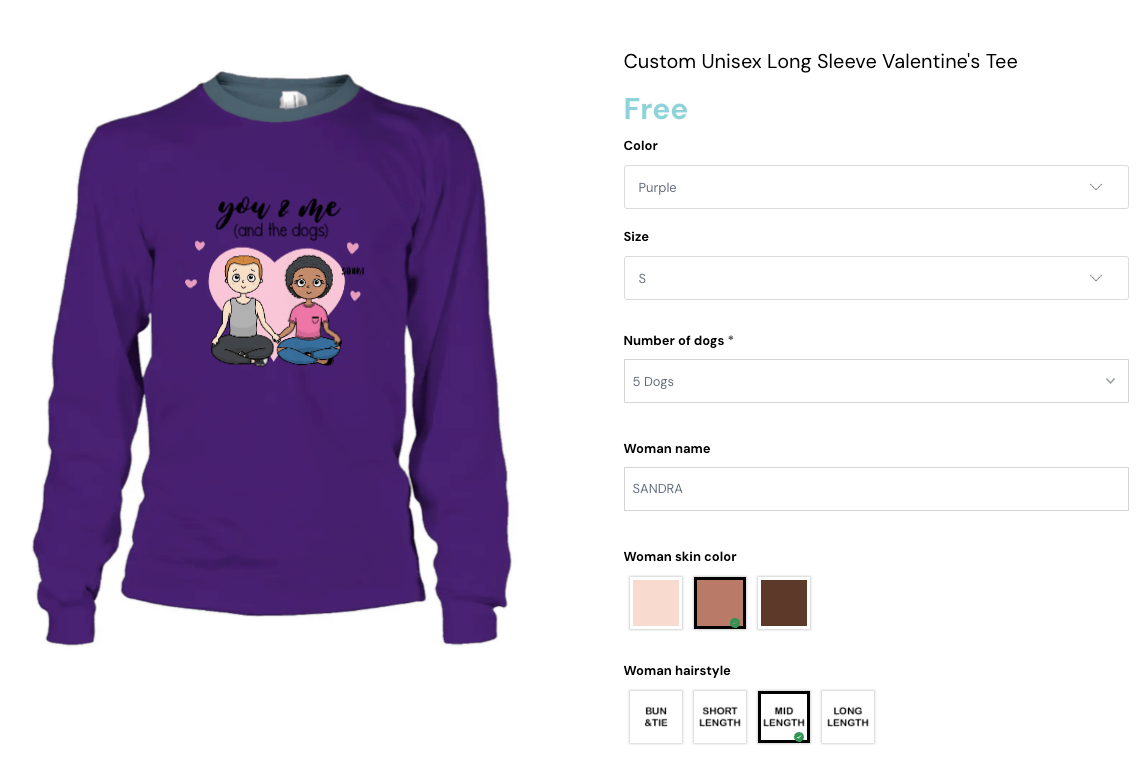
Customily is purpose-built for print-on-demand businesses and personalized apparel. Within that niche, it performs well. Direct integrations with POD fulfillment providers and a built-in clipart library make it a fast starting point for merchants in that specific category.
The limitations become evident quickly when product complexity increases. Complexity breaks it. The interface is optimized for flat, 2D personalization: text placement, image uploads, and basic color fills. It is not built for multi-component configuration with conditional logic. Merchants who start on Customily and then try to build more sophisticated custom products often find themselves hemmed in. The monthly subscription cost of forty-nine dollars plus additional transaction fees also adds up far faster than their pricing page suggests once your store starts processing a meaningful volume of orders.
4. ShapeDiver: Best for complex industrial CAD and Grasshopper
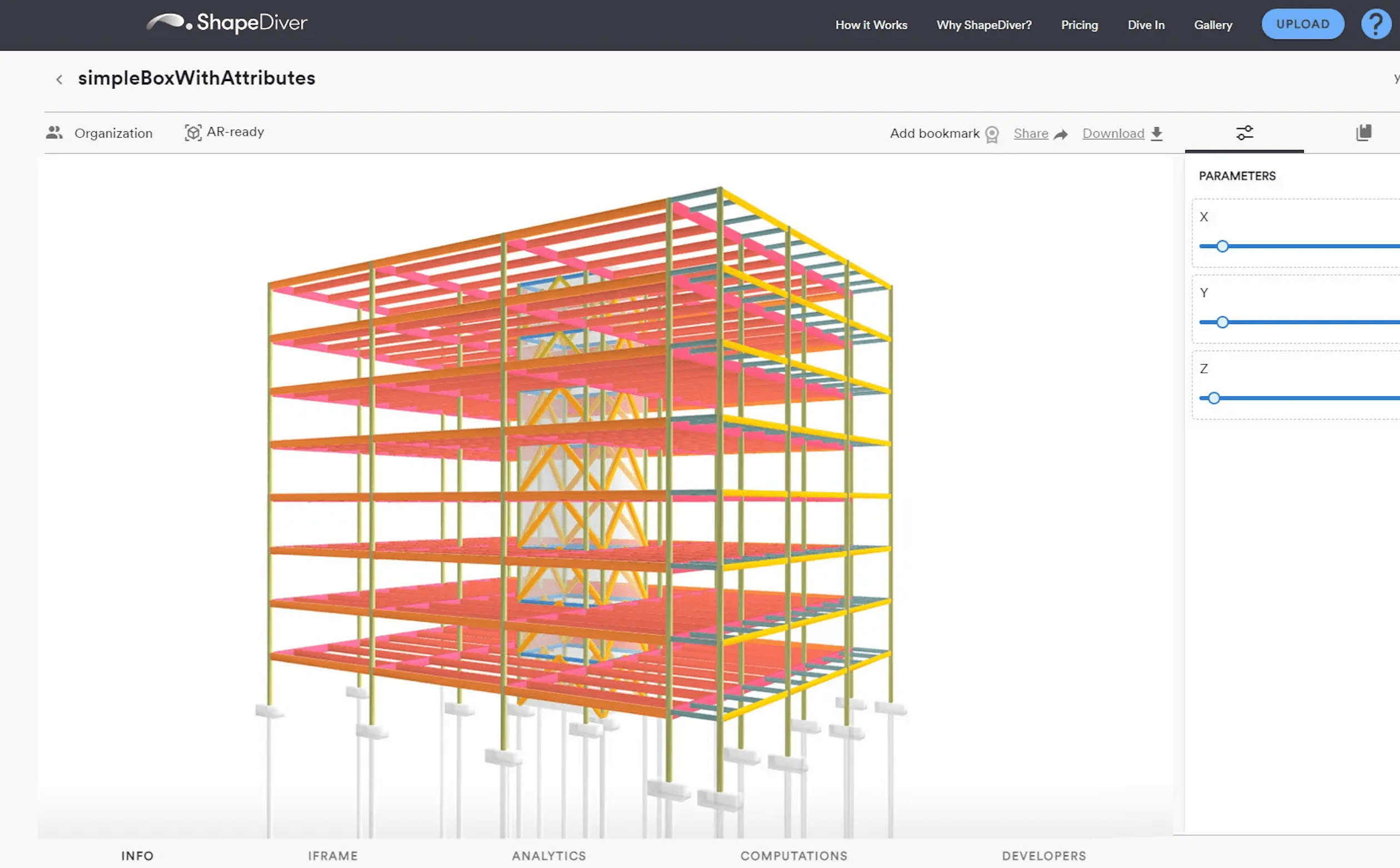
ShapeDiver operates in an entirely different category than the other tools on this list. It is built on top of Rhino and Grasshopper, which means it is designed for parametric, mathematically precise product configuration: the kind required for modular architecture, industrial equipment, and complex engineered components.
For that use case, it is powerful. For a Shopify merchant selling custom furniture or personalized accessories, it is the wrong tool entirely. The setup requires dedicated CAD designers and developers. It is highly technical. The asset management workflow is nothing like a standard e-commerce operation, and the learning commitment is measured in months rather than hours. ShapeDiver belongs in a conversation about industrial manufacturing tools, not DTC e-commerce.
5. Angle 3D: Best for simple color and part swaps
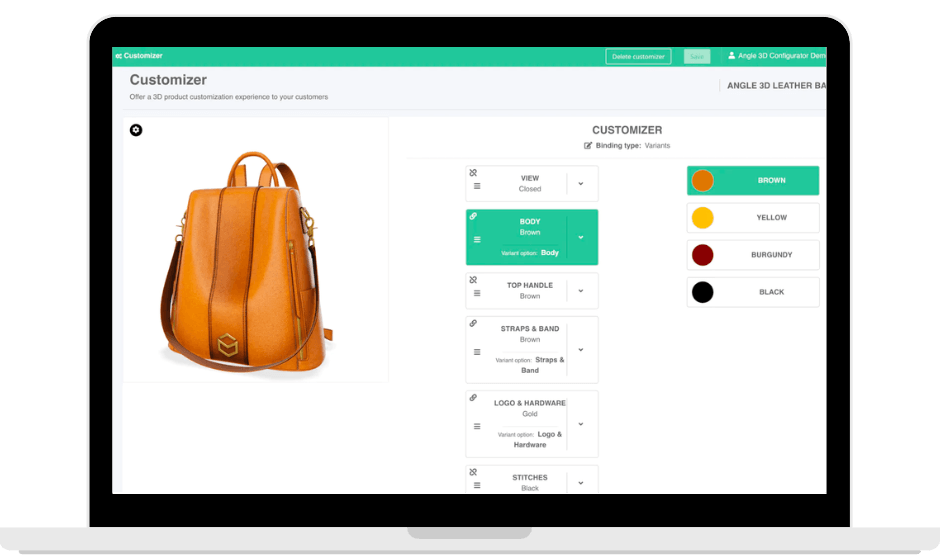
Angle 3D is a lightweight 3D visualization tool tailored to merchants who need basic color swaps, texture changes, and simple component substitutions on standard 3D models. The setup is relatively simple for that narrow use case. It is quick.
Beyond basic swaps, the platform runs out of capability. There is no deep conditional logic engine, no multi-angle 2D layering for brands that don't want to invest in 3D assets, and no automatic generation of print-ready production files. For a small store with low product complexity and a very tight budget that simply needs to display a basic 3D model with a few color options, it's a perfectly workable entry point. For anything more operationally demanding, it is not built for the job.
Comparison and evaluation
Feature-by-feature comparison matrix
Feature | Kickflip | Zakeke | Customily | ShapeDiver | Angle 3D |
Best For | E-Commerce & DTC | 3D/AR & VTO | Print-on-Demand | Industrial CAD | Simple 3D Swaps |
Target Audience | Shopify/WooCommerce brands | Multi-platform brands | POD & Apparel | Manufacturers/B2B | Entry-level DTC |
Visual Quality | ⭐⭐⭐⭐⭐ High-fidelity 2D layers | ⭐⭐⭐⭐ 3D/AR | ⭐⭐⭐ Flat 2D | ⭐⭐⭐⭐⭐ Parametric 3D | ⭐⭐⭐ Basic 3D |
Ease of Setup (No-Code) | ✅ Fully no-code | ⚠ Technical setup required | ✅ Simple for POD | ❌ Requires CAD/Dev | ⚠ Moderate |
Advanced Conditional Logic | ✅ 200+ options, full rules engine | ✅ Available | ⚠ Limited | ✅ Parametric | ❌ Basic only |
Print-Ready File Export | ✅ Auto SVG/PDF generation | ⚠ Limited | ✅ POD-specific | ✅ CAD exports | ❌ Not available |
Shopify/WooCommerce Native | ✅ Native integration | ✅ Supported | ✅ Supported | ❌ Custom only | ⚠ Limited |
Headless/API Support | ✅ Strong API | ✅ Available | ⚠ Limited | ✅ Available | ❌ Limited |
Starting Price | $59/month + sliding fee | Variable + transaction fees | $49/month + fees | Custom/Enterprise | Free tier available |
GDPR/CCPA Compliant | ✅ | ✅ | ⚠ Check vendor | ✅ | ⚠ Check vendor |
Pricing models and scalability
The pricing structure debate in this category is highly significant for growing brands. Transaction-based fees that don't decrease with volume create a tough dynamic: the more successful you are, the more your software costs as a percentage of revenue. That's a ceiling, not a foundation.
Kickflip's model is structured differently. The Scale plan at $59/month carries a transaction fee that starts at 1.95% and decreases as sales volume grows, eventually reaching 0%. For a brand in early-stage testing, the fee aligns software cost with actual revenue: you're not paying for volume you haven't generated yet. For a high-volume brand operating at scale, the transaction fee structure becomes progressively more advantageous over time, which is the exact opposite of what most transaction-based competitors offer.
Predictable SaaS budgeting matters more than most vendors acknowledge. Finance teams at growth-stage companies need to forecast software costs as a line item. A tool whose monthly cost can swing significantly based on sales volume makes that forecasting difficult. Kickflip's hybrid model, a fixed base plus a declining variable component, gives brands a cost floor they can plan around and a ceiling that drops as they grow.
A closer look at Kickflip: Features, integrations, and merchant benefits
The code-free administration experience
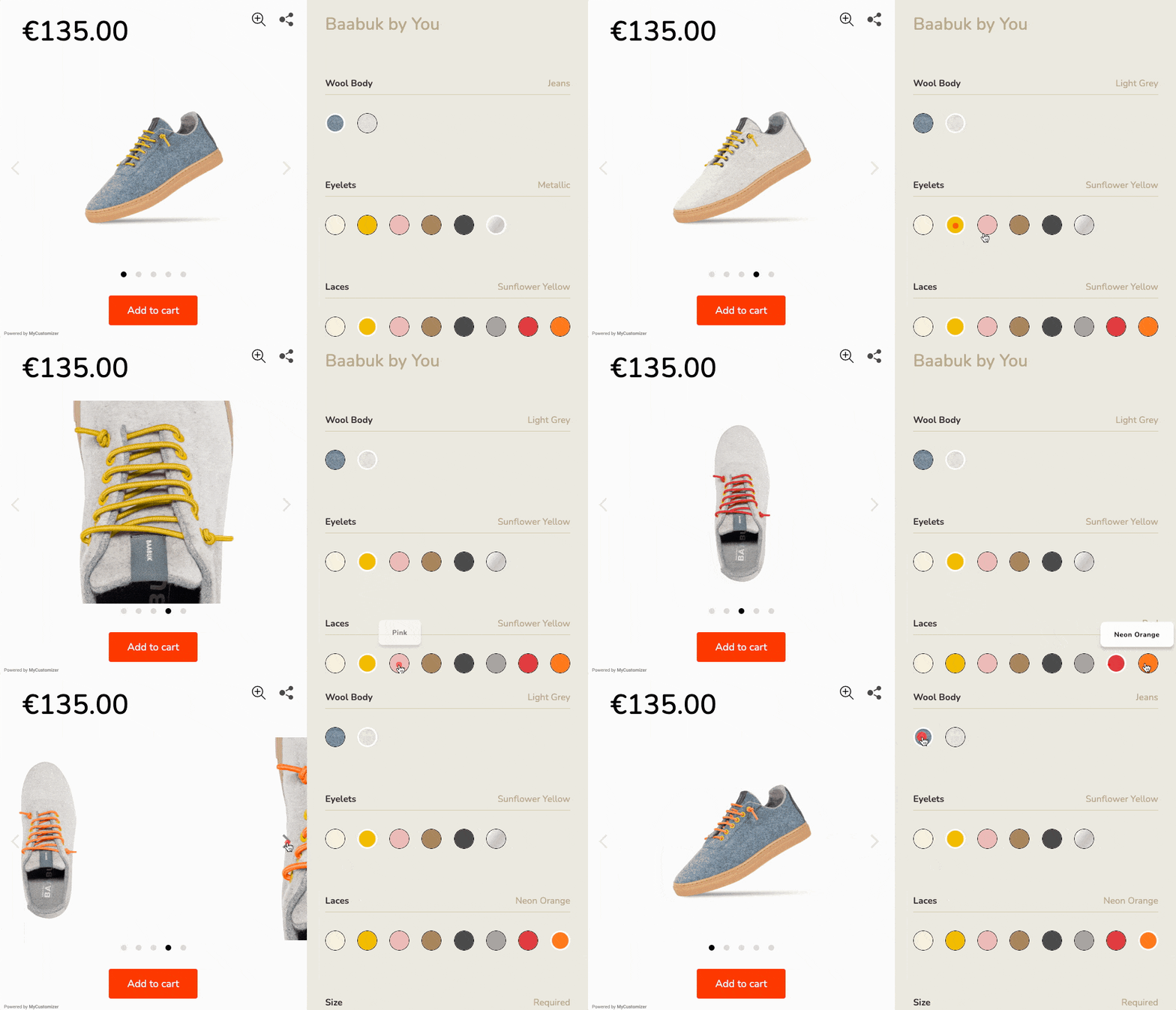
One of the more enduring myths in the product customization space is that a high-quality configurator requires ongoing developer involvement to maintain. Kickflip was built specifically to disprove that. It is simple. The entire administration interface is click-based: merchants build their first customizer, configure their logic rules, and update their product catalog without writing a single line of code.
That matters for speed-to-market in a concrete way. This quick setup time reduces average product customization launch times for brands using Kickflip to under two weeks, compared to the eight-week average for brands building or heavily customizing other solutions. For a DTC founder who wants to test a custom product line before committing to a full catalog expansion, that compression is the difference between a fast market test and a slow, expensive development project.
Updating the catalog independently, such as adding new color options, adjusting pricing rules, or introducing a new product variant, is something a non-technical team member can do in an afternoon. That operational independence is undervalued until you've experienced the alternative: waiting in a developer queue every time you want to change a product option.
Advanced design fidelity: Layers, masks, and logic
For merchants who care about design exactness, and in premium product categories, that's most of them, Kickflip's layer-based visual system is where the platform earns its position. Multi-angle previews, transparent PNG layer compositing, and precise image masking give designers the exact pixel-level control they need to produce a premium configuration experience that perfectly matches the brand's strict visual standards.
The platform handles over 200 customization options without degrading rendering performance. That's not a trivial engineering achievement. Maintaining high-resolution visual quality across dozens of simultaneous layer combinations, on devices ranging from a flagship iPhone to a mid-range Android, requires careful optimization. Kickflip's asset pipeline is built for that constraint.
The logic engine operates behind the scenes in a way that's unseen by the customer but critical to the merchant. Only compatible parts can be selected together. Options that would create an invalid or unfulfillable configuration are blocked before the customer reaches them. The result is a configuration flow that feels frictionless to the buyer and produces clean, manufacturable orders on the backend.
Frictionless Shopify, Wix and WooCommerce integrations
Kickflip integrates directly with Shopify, Wix and WooCommerce. It appears as a natural extension of your existing store theme rather than an embedded third-party widget. Inventory synchronization, dynamic pricing, and cart data all flow through the standard checkout process: custom orders don't require a separate fulfillment pathway or manual data reconciliation.
The API is well-documented and headless-compatible, which matters for brands that have outgrown a standard Shopify setup and are running custom front-ends or composable commerce architectures. It scales easily. The configurator can be deployed as a standalone component within a larger technical stack without requiring a full platform migration.
Kickflip is fully GDPR and CCPA compliant, which is a non-negotiable requirement for brands selling into the EU and North America. Page load performance is optimized specifically to avoid the severe search engine optimization and conversion rate drawbacks that typically come with heavy, poorly optimized third-party configurator scripts.
Operational ROI: Slashing returns and support tickets
The 50% reduction in return rates that Kickflip merchants experience isn't a marketing theory. It is a direct result of closing the expectation gap. When a customer can see exactly what their configured product will look like, from multiple angles, before they check out, the 'this isn't what I expected' return almost disappears. The visual preview is doing the work that customer service would otherwise have to do after the fact.
The 22% reduction in customer support tickets follows from the same mechanism. Fewer emails, fewer headaches. Buyers who have designed their product in a real-time configurator don't need to email back-and-forth to confirm their selections. The order record is precise, the production file is generated automatically, and the customer has a visual record of exactly what they ordered.
For scaling CEOs, the compounding effect of these metrics is the real argument. A 50% reduction in returns, a 22% drop in support volume, and the elimination of manual production file preparation don't just reduce costs. They free up operational capacity that can be redirected toward growth rather than maintenance.
Implementation guide: Choosing and integrating the right tool
Step 1: Assess your product complexity and business model
Before assessing any specific tool, map your actual customization requirements against the categories in this guide. Know your needs. A brand selling custom-engraved jewelry with three metal options and a text field has different needs than a brand selling modular furniture with dozens of component combinations and size-dependent pricing.
The key operational question is where your current bottleneck lives. If it's setup time and visual asset creation, you need a tool with a fast onboarding path and a manageable asset pipeline. If it's downstream fulfillment, such as manual order processing, production file preparation, or BOM generation, the automation layer is your priority. If it's both, which is common, you need a platform that addresses the full workflow rather than just the front-end experience.
For Shopify and WooCommerce brands looking for high-quality visuals, fast setup, and a configuration engine that handles real product complexity, Kickflip is the clear choice. The decision framework simplifies quickly once you've matched your requirements against what's currently available in the market.
Step 2: Prepare your visual assets
Asset preparation is where most configurator implementations falter because the software is ready but the images aren't. Getting this right before you start configuring saves significant time.
Organize your visual assets by angle first, such as front, back, side, and detail, and then by layer within each angle. Keep it structured. Each customizable element (base color, component, personalization) needs its own transparent PNG layer for every angle you plan to show. Backgrounds, shadows, and fixed elements should be separated from customizable layers from the start.
File size optimization is non-negotiable for mobile performance. A well-optimized PNG layer for a product configurator should be large enough to look sharp on a retina display but small enough to load without noticeable delay on a mobile connection. Aim for the smallest file size that preserves visual quality at your intended display dimensions: this is a judgment call that depends on your product category, but erring toward smaller files is almost always the right decision for conversion performance.
You don't need 3D models to create a premium experience for customers. Well-executed 2D layers, properly organized and optimized, produce a configuration experience that converts at least as well as 3D for most product categories, and loads significantly faster.
Step 3: Configure your rules and pricing
Map the customer's configuration journey before you touch the tool. Plan first. Write out the steps in sequence: Step 1 selects the base, Step 2 selects the primary component, Step 3 handles personalization. That sequence should reflect how a customer naturally thinks about building the product, not how your SKU structure is organized internally.
Conditional logic rules follow from that map. For each step, identify which options from previous steps should restrict or expand the available choices. Document these dependencies clearly, a spreadsheet works fine, before you configure them in the tool. Trying to build logic rules without a pre-existing map is how you end up with a configuration flow that works in most cases but breaks in edge cases you didn't anticipate.
Pricing rules should be assigned at the option level, not the SKU level, wherever possible. That precision is what allows the real-time price display to update accurately as each selection is made, which is both a transparency feature for the customer and a driver of higher order value for the merchant. Test the complete customer journey on at least three devices, a desktop browser, an iOS device, and an Android device, before you go live. Configuration flows that work perfectly on desktop frequently have layout or interaction issues on mobile that only become visible when you're genuinely using the interface.
Conclusion
Product configuration tools have moved from a conversion optimization tactic to a core operational infrastructure decision. Winning brands in 2026 aren't just offering personalization. They're running it through systems that automate the entire workflow from customer design to production file, with visual quality that eliminates returns and a pricing engine that drives higher order value on every order.
The data is consistent across implementations: a 46% conversion lift, a 31% increase in average order value, a 50% reduction in returns. Those aren't marginal improvements. They're the kind of metrics that change the unit economics of a product line.
Kickflip stands out as the clear first choice for Shopify and WooCommerce brands because it's the only tool in this category that delivers premium visual quality, a strong conditional logic engine, automated production file generation, and a setup that is fully customizable in a pretty short period of time. It's a no nonsense way to do that, all at a price point that aligns with incoming revenue rather than stifling growth. The platform has been doing this since 2010, across industries from sporting goods and footwear to furniture and jewelry, for brands ranging from fast-growing DTC startups to established names like Suunto and Dick's Sporting Goods.
Setting this up is simpler than most merchants expect. Do not wait. The asset preparation takes the most time; the configuration itself, for a well-organized product, is measured in hours rather than weeks.
If you're a DTC founder or scaling CEO ready to launch a custom product line, Kickflip's 14-day free trial lets you build your first configurator and see the interface in action before agreeing to anything. Most merchants have a working prototype within a few hours of starting. Try it today.
Frequently asked questions
What is the difference between a product configurator and a CPQ tool?
CPQ (Configure, Price, Quote) tools are built for B2B sales workflows: they manage complex pricing calculations, generate formal sales quotes, and coordinate approval processes across enterprise sales teams. A product configurator, by contrast, is designed for the end-user experience on an e-commerce storefront: it's the visual, interactive interface that lets a customer build and preview their product in real-time before adding it to their cart. The two categories overlap in some enterprise contexts, but for DTC and standard e-commerce brands, a product configurator is the relevant tool: CPQ is solving a different problem entirely.
Do I need 3D models to use a product configuration tool?
No. Tools like Kickflip are built around high-quality 2D layer compositing, transparent PNG layers organized by angle and customization element, which produces a premium experience for customers without requiring 3D assets. For most product categories, well-executed 2D layers load faster than 3D models and convert at comparable or higher rates. 3D is worth considering for specific categories where spatial understanding is critical, like furniture placement, but it's not a necessity for a premium configuration experience.
How does a product configurator affect page loading speed?
It depends entirely on the tool and how it's executed. A poorly optimized configurator with uncompressed assets and heavy rendering scripts will add latency to your product page, which directly impacts both conversion rates and SEO rankings. Modern, well-engineered tools like Kickflip are built specifically to minimize this impact: the asset pipeline is optimized for web delivery, the rendering engine is lightweight, and the integration with Shopify and WooCommerce is designed to avoid adding unnecessary script weight to your theme. Choosing a tool that treats page performance as a first-class concern, rather than an afterthought, is one of the more impactful decisions in this evaluation.
Will a product configurator integrate with my existing Shopify theme?
Yes, premier tools integrate natively and adapt to your theme's styling without custom coding. No coding needed. Kickflip, for instance, appears as a natural extension of your existing Shopify or WooCommerce theme. It doesn't impose a foreign visual style or require you to rebuild your product pages around the configurator. Custom order data, selected options, and pricing flow directly through your standard checkout process. For brands on headless or custom stacks, Kickflip's API supports integration without requiring a platform migration.
Future reading
2D Product Configurator Explained: When It's Better Than 3D
Best Product Configurator Software: Expert Guide for Ecommerce, CPQ, and Manufacturing
WooCommerce Product Configurators: Top 5 Apps to Look Into
Share This article

Written by Marie Lamonde
June 19th, 2026
Marie Lamonde is a Content Marketing Manager at Kickflip with 8 years of experience writing about digital marketing, SaaS, and ecommerce. She specializes in creating clear, search-driven content that attracts, engages, and converts.


Maarten Luyckx
Osaka World
The user-friendly interface of Kickflip, combined with excellent customer service, ensured that this project was brought to a successful and beautiful conclusion.
Shopify App Store
May 20, 2021

Marie-Laetitia Rossazza
My Dust Bag
It took me a long time to find the perfect customizer app, and I’m so happy to say that I finally did! Kickflip is truly the best app on the market. The front end and back end are excellent, and the team behind it is incredibly kind and helpful!
Shopify App Store
September 1, 2023

Brad Jurga
All-Star Sporting Goods
Kickflip made everything easy, from designing the builder all the way through launch. We’re designing truly custom equipment for elite baseball players and this platform allows us to have better engagement and excitement around our brand. We’re seeing an instant return.
Shopify App Store
June 16, 2025

Kasper Taylor
CodedInk
My experience with both the product and the support team has been fantastic. The user interface and user experience are excellent. The features are powerful, and the WooCommerce integration is seamless and easy to set up.
G2.com
June 16, 2025

Saber Naceur
Vinylacy
By far, and I truly mean it, the best customizer available on Shopify. It’s easy to understand and manage, offers options for all types of products, and works extremely well. On top of that, it looks beautiful and feels premium. Highly recommended.
Shopify App Store
December 17, 2022

Jesus Guillermo de León Pérez
Dismo
Kickflip is a fantastic tool. It’s super intuitive, easy to use, and packed with capabilities. You don’t have to be an expert or have experience with other products to get started. The support team is also great and very responsive.
Shopify App Store
July 10, 2024

Frieder Urban
Era of Arc
We were looking for an uncomplicated configurator that was quick and easy to set up, offered plenty of design options, and worked reliably with fast loading times. We tested many configurators on the market, and with Kickflip, we found exactly what we needed.
Shopify App Store
October 10, 2024

John Taggart
Jack Harry and Ollie
What a great addition to our business Kickflip has been. It’s been fantastic to offer our customers the ability to personalize their orders. The support has been excellent, and we especially love that the pricing is tied to our success as customers make purchases.
Shopify App Store
May 7, 2021

TJ Garske
The Net Return
Kickflip saves our team a ton of time by eliminating the need to create custom mockups for customers. Customers can build their product themselves and place an order instantly, without any back-and-forth.
G2.com
January 26, 2026

Amin Hasani
CURVD
After extensive research into product customizer tools, we chose Kickflip for many reasons. We don’t like complicating simple tasks for customers, and Kickflip helped us simplify the process and create a seamless customer experience.
Shopify App Store
July 29, 2025