WooCommerce Product Variations: Setup, Limits, and When to Upgrade
Written by Marie Lamonde
July 23rd, 2026

Table Of Contents
Struggling to display product variations that consistently convert? Looking to offer more product options without the WooCommerce headache?
Here's the deal: WooCommerce product variations are purchasable options generated from a single variable product. They let customers select combinations; size, color, material, and each combination carries its own price, SKU, image, and stock level, all managed from one product page.
That covers the mechanics. It doesn't cover the operational reality of managing variations at scale. A setup that works beautifully for a three-size, two-color t-shirt starts fracturing once you push it toward a product with fifty-plus combinations, conditional dependencies, or real-time pricing logic.
Below: how to configure variations correctly from day one, where the native system breaks down technically, and what a practical upgrade path looks like once you've outgrown the default toolset.
1. Introduction to WooCommerce Product Variations
1.1 What is a variable product in WooCommerce?
A variable product is a native WooCommerce product type that lets merchants offer multiple options on one product page. Each unique combination, a variation, acts as its own database entry with independent pricing, SKU, and inventory.
Parent vs. child records:
Parent product holds the general information: title, global description, tax class, category assignments.
Child products (the variations) carry everything transactional: price, SKU, stock quantity, weight, dimensions, and a dedicated image.
See the WooCommerce Variable Product Docs for reference.
This parent-child architecture shapes every downstream decision about your catalog. When a customer buys "Blue, Size M," they're buying a specific child record, WooCommerce charges that child's price, pulls from that child's stock, and generates the order line item from that child's SKU. The parent is just a container and display vehicle.
Why it matters for merchants: instead of listing a jacket as twelve standalone simple products (one per color-size combo), a single variable product keeps the catalog clean, concentrates reviews and SEO equity on one URL, and gives customers a coherent selection experience. The operational savings compound across any catalog size.
That said, the architecture has a ceiling. Once product complexity exceeds what flat attribute combinations can express, conditional logic, real-time pricing, visual rendering, the parent-child model stops being an asset and becomes a constraint.
1.2 Product attributes vs. variations
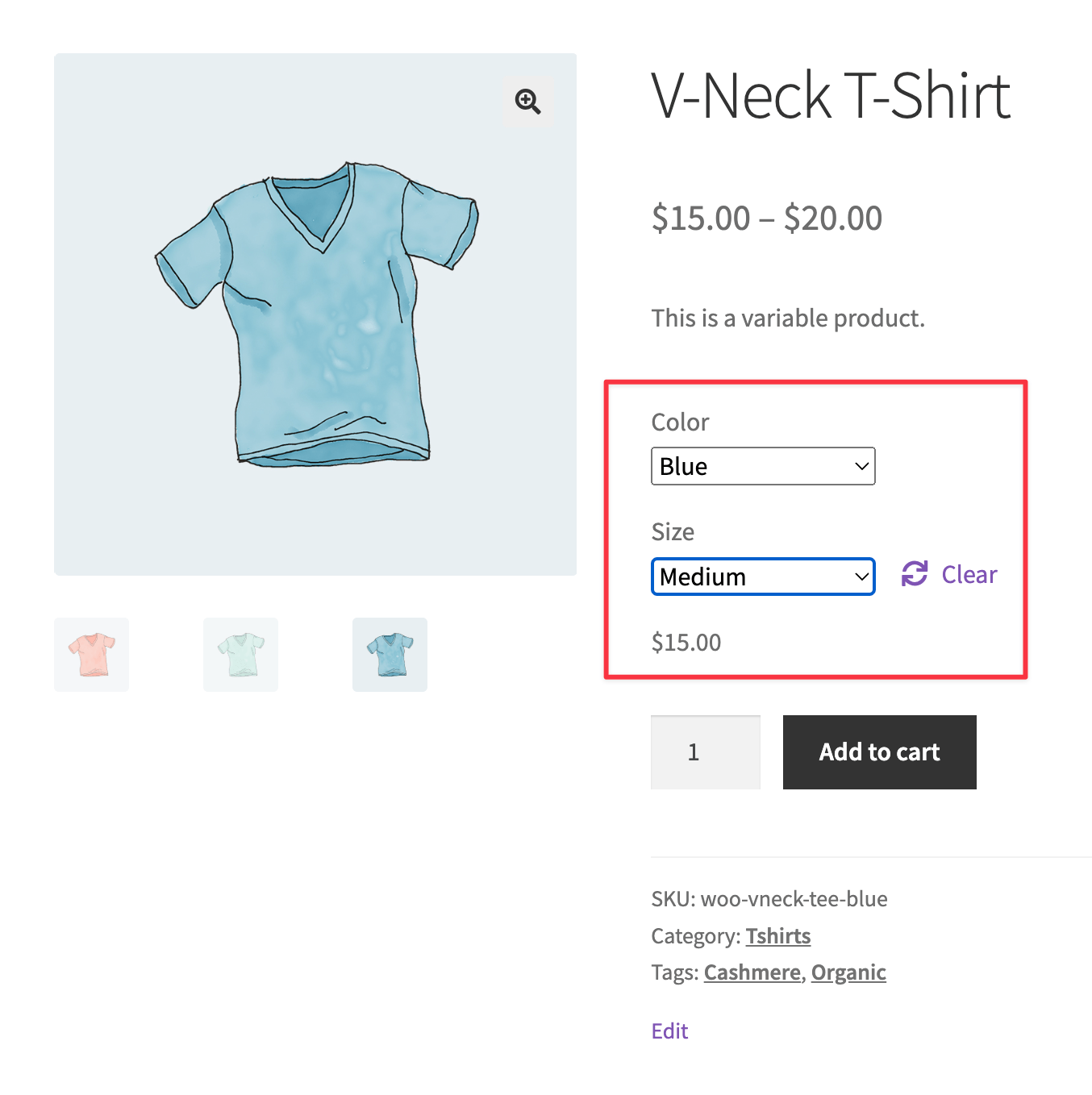 Product attributes are static descriptors: "Color" with values Red/Blue/Green, or "Material" with values Leather/Canvas/Nylon. No price, no SKU, no stock count attached.
Variations are what you get when attributes collide: "Red, Leather" is a variation. "Blue, Canvas" is a variation. Each is a purchasable, independently configurable entity. An attribute can exist purely for display without ever generating a variation, but a variation can't exist without the attributes that define it.
Two attribute types:
Global attributes — created under Products > Attributes in the dashboard. Reusable across your entire catalog. Ideal for consistent properties like size, color, or brand.
Custom attributes — created inside a single product's edit page. Exist only for that product. Useful for one-off options that don't belong in a store-wide taxonomy.
Conflating the two has real consequences: merchants who create custom attributes for properties that should be global end up with fragmented data, broken filtering on shop archive pages, and a database that grows incoherently. Getting the taxonomy right early matters more than it seems.
1.3 Why standard dropdown lists hurt user experience
The visualization gap. A shopper selects "Forest Green" and "Textured Matte" from separate menus, and gets a static gallery image that may not represent that exact combination, they have to imagine the final result. Tolerable for a $30 item. A conversion killer for a $300 customizable product where color and finish are central to the decision.
Interactive customization is like giving customers a fitting room, not just a catalog. Standard dropdowns do the opposite.
Other friction points:
Hidden pricing and stock. Native dropdowns hide price and stock status until every attribute is selected. A customer checking whether "large, olive green" is in stock has to click through the entire sequence to find out, and start over if it's unavailable.
Mobile friction. Native selection elements trigger the device's native picker UI, interrupting the page experience and often forcing users to scroll back to the product image after each selection. In markets where mobile dominates browsing, this isn't minor.
Premium product risk. A high-ticket customizable item like a bespoke watch strap, made-to-order bag, or custom bicycle component, needs its purchase interface to communicate quality. Dropdowns make a $400 product feel like a generic catalog item, eroding the buyer confidence needed to justify the price.
2. How to Create and Set Up Product Variations
Step 1: Create global or custom attributes
Go to Products > Attributes.
Name the attribute ("Material," "Frame Size," "Finish"), set the slug, choose a sort order, click Add Attribute.
Click Configure terms to add values. Name them for the customer ("Brushed Aluminum," not "BA-01"). These names surface directly in front-end dropdowns.
For custom (product-specific) attributes: open the product's edit page → Attributes tab → select "Custom product attribute" → Add.
Critical checkbox: "Used for variations." Every attribute used to generate variation combinations must have this checked. Forgetting it is the #1 reason setups fail and the failure is silent: the Variations tab simply won't generate the combinations you expect.
Step 2: Convert a simple product to a variable product
Open the product editor → Product Data meta box → change the type dropdown from "Simple product" to "Variable product." The "General" tab disappears; a "Variations" tab appears.
Go to Attributes → select your global attribute → Add → choose the terms to apply (or "Select all"). Custom attributes are already listed here.
Click Save attributes before going to the Variations tab, this commits the attribute-to-product relationship. Skipping it is another common cause of "my variations aren't showing up" tickets.
Step 3: Generate variations, add SKUs, pricing, and stock
In the Variations tab, you have two options:
Add variation creates one combination manually. Good for products with just a few options.
Create variations from all attributes generates every combination programmatically. Faster for anything with more than a handful.
WooCommerce caps automatic generation at 50 variations per run, to prevent PHP memory exhaustion and timeouts. A product with 4 sizes × 5 colors × 3 materials = 60 combinations, so you'd run the bulk tool twice.
Each generated variation appears as a collapsed row. Click to expand and set:
SKU — unique inventory identifier. Don't leave blank; missing SKUs create fulfillment headaches.
Regular Price — required. WooCommerce won't display a variation without one.
Sale Price — optional, useful for time-limited promotions.
Stock management — check "Manage stock?" for per-variation quantity and backorder rules.
Variation image — assign an image that swaps in when the combination is selected (the closest native WooCommerce gets to visual feedback).
At the top of the Variations tab, Default Form Values let you pre-select a combination on page load (e.g., "Size: Medium, Color: Navy"), so customers land on a valid, purchasable option instead of a blank state, reducing friction between page load and add-to-cart.
3. Limitations and Challenges of Default Variations
3.1 The 50-variation threshold and performance
≤30 variations: WooCommerce preloads all variation data as inline JSON. Dropdown selections update prices, images, and stock instantly — no server round-trip.
31+ variations: WooCommerce switches to static dropdowns and only fires an AJAX request after every attribute is selected. The page waits for a server response before showing price or availability — a noticeable spinner on fast connections, genuine frustration on slow mobile ones. Details in the WooCommerce AJAX Variation Threshold docs.
The downstream consequence: the error "Sorry, no products matched your selection. Please choose a different combination." This is one of the most common sources of WooCommerce support threads. Because dropdowns don't update dynamically to reflect availability, users have no way to know a combination is invalid until they've already selected it.
Page performance impact: high variation counts bloat the database and force the browser to parse larger JSON payloads. For products with 100+ variations, this degrades Interaction to Next Paint (INP) — a Core Web Vital that factors into search rankings. Pushing native variations to their limit often means trading SEO performance for catalog flexibility.
Some developers raise the woocommerce_ajax_variation_threshold filter to restore dynamic dropdowns above 30. The consensus: raising it to 100+ adds 500ms–2s of server processing time and worsens mobile load. The threshold exists for a reason.
3.2 Difficulty bulk-editing complex product options
Managing hundreds of variations manually is like organizing a messy closet without the right containers; move one thing, three others fall out of place.
Example: a supplier raises material costs, and you need to increase prices across 200 variations spread across 15 products. Native bulk tools let you set a flat price across all variations in a product, no conditional rules, no percentage adjustments tied to specific attributes, no tiered pricing. Every nuanced change means opening individual variation records.
At 200 variations, that's a significant time cost. At 2,000, it's unsustainable, and the manual process compounds error risk: incorrect prices, broken SKUs, mismatched images, inaccurate stock counts. Each has a direct customer consequence (eroded trust, fulfillment disruption, returns). Native bulk editing tools were built for stores with modest variation counts and haven't kept pace with modern DTC catalog complexity.
3.3 No advanced visual customization out-of-the-box
WooCommerce variations are architecturally unidimensional, there's no native way to say "if Frame Type: Carbon is selected, restrict Fork Type to carbon-compatible options only." Every attribute combination is treated as equally valid regardless of real-world compatibility, which often leads to customers ordering items that can't actually be built.
Swatch plugins (the most common visual upgrade) replace dropdown text with color circles or thumbnails.
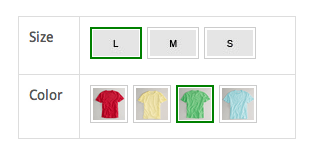 They help simple products, but still run on the same underlying variation database, inheriting all the performance limits above, with no fix for conditional logic or real-time pricing.
Real-time visual rendering, showing a customer their actual configured product, not just labels, is simply outside what native variations can deliver. That gap between expectation and reality is where returns originate.
4. Standard Variations vs. Visual Product Builders
4.1 When standard variations aren't enough
Signs you've hit the inflection point:
Hundreds or thousands of possible combinations
Customers regularly ask support "what does this look like with these options?"
Returns are driven by "not what I expected," not defects
Pricing depends on dimensions, materials, or add-ons that a flat price field can't express
The clearest case: multi-layered conditional logic. If selecting one option should dynamically change what's available for another (reflecting real manufacturing constraints), native variations can't model it. You either offer invalid combinations customers get frustrated by, or leave those records unpopulated, triggering "no products matched" errors at scale.
This isn't just a UX problem, it's a revenue problem: cart abandonment from customers who can't visualize the product, a flood of pre-purchase support inquiries, and elevated returns. These costs are real even when rarely attributed directly to the variation interface. Treating product configuration as a business discipline, not just a technical feature, is what separates stores that scale from those that plateau.
4.2 Kickflip: a visual product builder for WooCommerce
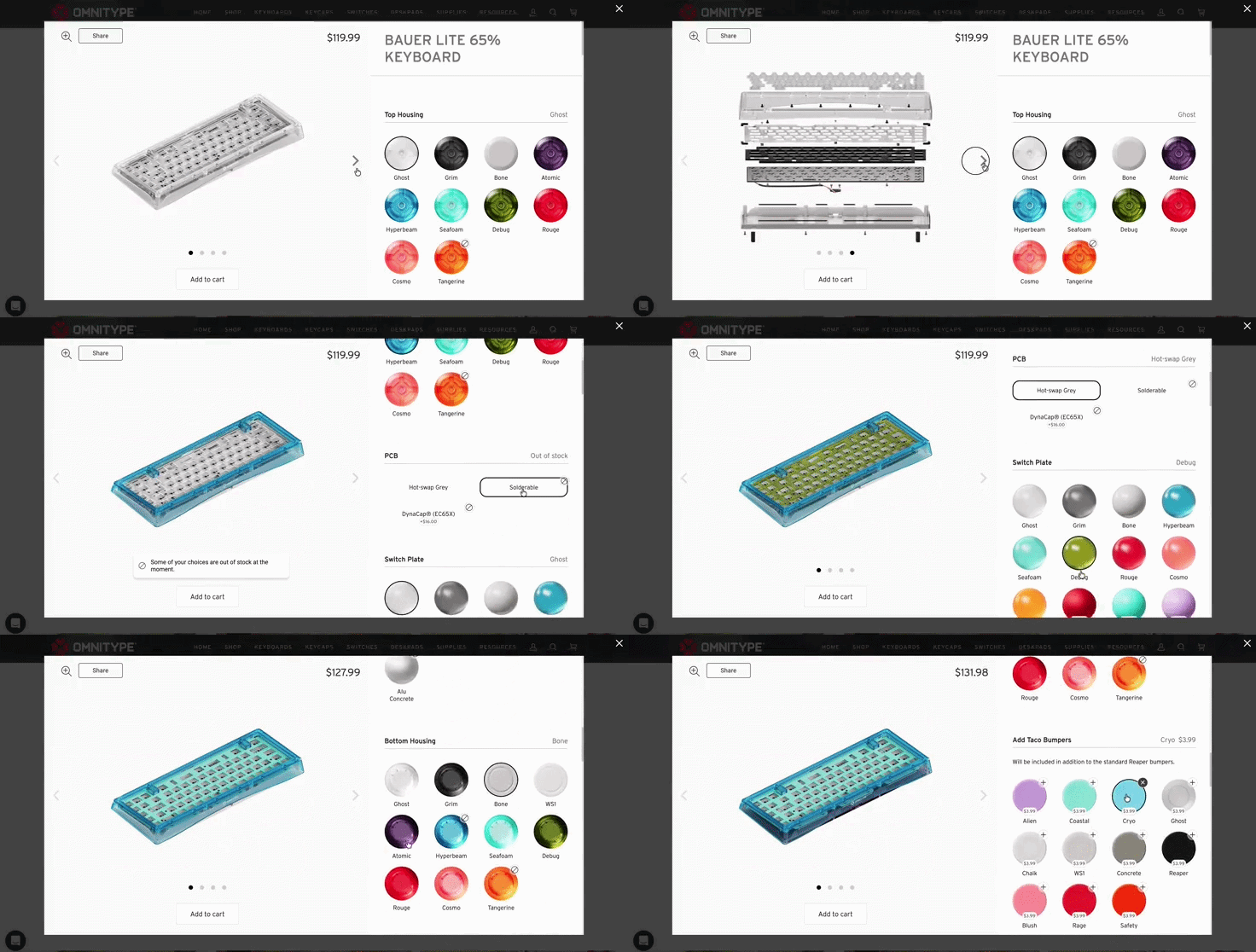 Kickflip is a no-code visual product customizer built for WooCommerce. It replaces static dropdowns with an interactive, multi-angle interface, a customer clicks a bag strap, selects "Cognac Leather," watches the image update in real time, and sees the price recalculate immediately.
Why the architecture matters:
Kickflip handles customization logic and rendering in a secure, cloud-based environment, so your WooCommerce database stays uncluttered. No thousands of variation child records, no multi-megabyte JSON payloads in the browser.
Unlimited variants become feasible because the complexity lives outside WooCommerce's native data structure.
The configurator loads asynchronously, the core product page loads immediately, the configurator initializes in parallel. INP scores stay healthy and mobile performance doesn't degrade as options expand.
Fulfillment is automated: when an order is placed, Kickflip generates high-resolution, print-ready production files (PNG and PDF) and delivers them directly to the merchant, closing the gap between "customer configured it" and "production team can build it."
DTC brands use Kickflip for exactly this kind of complexity; sporting goods, footwear, furniture, jewelry, apparel, categories where configuration depth and visual accuracy are central to the purchase decision.
Try Kickflip free for 14 days.
4.3 Visual customization and dynamic pricing in practice
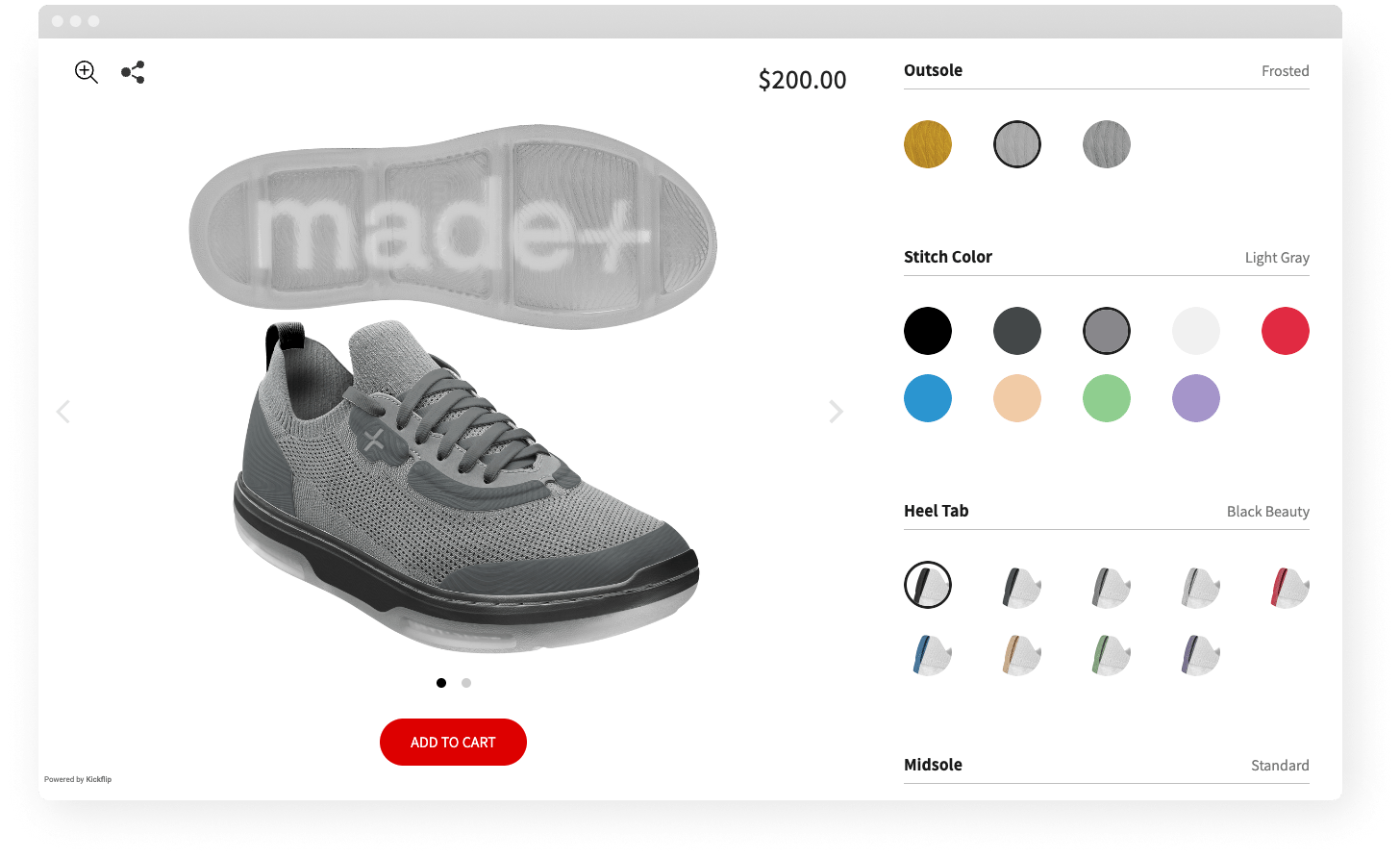 Real-time 2D visualization: shoppers click a component to change color, swap materials, add custom text, or upload logos, and every selection updates the preview instantly, from multiple angles. No "select and hope."
Conditional logic without code: Kickflip's rule engine lets a merchant selling custom bicycles hide steel fork options when a carbon frame is selected, or a jeweler restrict gemstone sizes based on setting style. Rules enforce product validity at the configuration layer, before the order is placed.
Dynamic pricing updates in real time as options change. Customers who see the price impact of each upgrade are more likely to add premium options deliberately, rather than being surprised at checkout and abandoning.
Reported impact from merchants who switched:
Up to 38% increase in Average Order Value — reflecting both upsell opportunity and buyer confidence
One made-to-order bag brand raised AOV from $88 to $112 (27%) via clearer visual and pricing feedback
28% reduction in refunds — customers who see exactly what they're ordering don't return it for looking different than expected
22% drop in support tickets — fewer pre-purchase "what does this look like?" inquiries
For stores treating product configuration as a strategic capability, the economics are worth noting: building a comparable custom configurator from scratch typically costs $100,000–$300,000. Kickflip's base subscription starts at $59/month, with a transaction fee that scales down as volume grows.
6. Conclusion
Native WooCommerce variations are well-designed for what they're built to do. A product with a handful of attributes and a manageable SKU count runs cleanly on the default architecture, no plugins, no tuning, no workarounds.
The bottlenecks become structural once you push past the 30-variation AJAX threshold, introduce conditional dependencies, or need customers to see their configuration rendered visually before buying. At that point the question isn't whether to upgrade, it's how, without rebuilding your store from scratch.
Addressing variant limitations through a dedicated visual configurator preserves site performance, closes the visualization gap, and gives merchants the conditional logic and dynamic pricing infrastructure complex products require. For WooCommerce stores at that inflection point, Kickflip's WooCommerce configurator, unlimited configuration complexity without touching your database architecture, is a concrete next step.
Frequently Asked Questions
Q1: How do I get product variations in WooCommerce?
Set the product type to "Variable product" in the Product Data meta box. Add attributes under the Attributes tab, check "Used for variations" for each, and save. Then go to the Variations tab and select "Create variations from all attributes" to generate combinations programmatically.
Q2: Can you set different prices for different variations of a product?
Yes. Every variation is an independent child product. Expand any variation in the admin panel to set its own regular price, sale price, SKU, weight, and stock level, pricing is not inherited from the parent and must be set per variation.
Q3: Why are my WooCommerce product variations not showing up?
Check these, in order: 1- Missing price: WooCommerce won't display a variation without a Regular Price; a single unpopulated variation in a set of fifty can suppress the whole dropdown. 2- Stock status: if "Manage stock?" is on, quantity is 0, and backorders are disallowed, the variation is treated as unavailable and may be hidden entirely. 3- The "Enabled" checkbox on the variation: easy to uncheck accidentally during bulk edits. 4- "Used for variations" on the attribute itself: if it was never checked, or variations were never generated after attributes were saved, no selection interface appears at all.
Q4: What is the WooCommerce product variations limit?
A default AJAX threshold of 30 variations. Beyond that, products switch from dynamic inline dropdowns to static AJAX loading, introducing delays and "no products matched" errors. The bulk generation tool is separately capped at 50 variations per run to prevent server timeouts.
Q5: How do I display variation dropdowns or swatches on the shop page?
By default, WooCommerce shows a "Select options" button (not "Add to cart") on the shop catalog page — variation selectors only appear on the individual product page. Showing them on the catalog grid requires a dedicated plugin. It's a simple setup, but loading variation data for every product on a catalog page multiplies database queries, which can slow page load for large catalogs with high variation counts, caching and query optimization become necessary at that point.
Q6: How do I hide an attribute on the product page?
In the Attributes tab, uncheck "Visible on the product page" for that attribute. It's removed from the front-end "Additional Information" tab while still working as a variation generator on the backend, useful for internal-only attributes like manufacturing codes or supplier references.
Future reading
WooCommerce Product Configurators: Top 5 Apps to Look Into
What is WooCommerce?
Woocommerce Product Configurator - The Ultimate guide
Share This article

Written by Marie Lamonde
July 23rd, 2026
Marie Lamonde is a Content Marketing Manager at Kickflip with 8 years of experience writing about digital marketing, SaaS, and ecommerce. She specializes in creating clear, search-driven content that attracts, engages, and converts.


Maarten Luyckx
Osaka World
The user-friendly interface of Kickflip, combined with excellent customer service, ensured that this project was brought to a successful and beautiful conclusion.
Shopify App Store
May 20, 2021

Marie-Laetitia Rossazza
My Dust Bag
It took me a long time to find the perfect customizer app, and I’m so happy to say that I finally did! Kickflip is truly the best app on the market. The front end and back end are excellent, and the team behind it is incredibly kind and helpful!
Shopify App Store
September 1, 2023

Brad Jurga
All-Star Sporting Goods
Kickflip made everything easy, from designing the builder all the way through launch. We’re designing truly custom equipment for elite baseball players and this platform allows us to have better engagement and excitement around our brand. We’re seeing an instant return.
Shopify App Store
June 16, 2025

Kasper Taylor
CodedInk
My experience with both the product and the support team has been fantastic. The user interface and user experience are excellent. The features are powerful, and the WooCommerce integration is seamless and easy to set up.
G2.com
June 16, 2025

Saber Naceur
Vinylacy
By far, and I truly mean it, the best customizer available on Shopify. It’s easy to understand and manage, offers options for all types of products, and works extremely well. On top of that, it looks beautiful and feels premium. Highly recommended.
Shopify App Store
December 17, 2022

Jesus Guillermo de León Pérez
Dismo
Kickflip is a fantastic tool. It’s super intuitive, easy to use, and packed with capabilities. You don’t have to be an expert or have experience with other products to get started. The support team is also great and very responsive.
Shopify App Store
July 10, 2024

Frieder Urban
Era of Arc
We were looking for an uncomplicated configurator that was quick and easy to set up, offered plenty of design options, and worked reliably with fast loading times. We tested many configurators on the market, and with Kickflip, we found exactly what we needed.
Shopify App Store
October 10, 2024

John Taggart
Jack Harry and Ollie
What a great addition to our business Kickflip has been. It’s been fantastic to offer our customers the ability to personalize their orders. The support has been excellent, and we especially love that the pricing is tied to our success as customers make purchases.
Shopify App Store
May 7, 2021

TJ Garske
The Net Return
Kickflip saves our team a ton of time by eliminating the need to create custom mockups for customers. Customers can build their product themselves and place an order instantly, without any back-and-forth.
G2.com
January 26, 2026

Amin Hasani
CURVD
After extensive research into product customizer tools, we chose Kickflip for many reasons. We don’t like complicating simple tasks for customers, and Kickflip helped us simplify the process and create a seamless customer experience.
Shopify App Store
July 29, 2025